












1Password and LastPass are two of the most well-known password managers in the industry. Both deliver robust features across their consumer and business offerings that protect client passwords, securely manage credentials, and streamline access management for teams and organizations.
In this comparison, I take a closer look at how 1Password and LastPass stack up for managed service providers (MSPs), examining their core features, usability, and overall value.
- 1Password and LastPass Comparison at a Glance
- 1Password and LastPass Billing and Pricing
- 1Password and LastPass Pros and Cons
- 1Password vs LastPass for MSPs: Feature Comparison
- Channel Insiders: What partners say about 1Password vs LastPass
- Verdict: Password managers are crucial for MSPs
- Methodology
- Frequently Asked Questions (FAQs)
1Password and LastPass Comparison at a Glance
| LastPass | 1Password | |
|---|---|---|
| Zero-knowledge architecture | Yes | Yes |
| MFA options | Authenticator apps, LastPass MFA, Duo Security, YubiKey USB, fingerprint scanners, RSA SecurID, Symantec VIP, SecureAuth | Authenticator apps, security keys like YubiKey and Titan |
| Multi-tenant platform | Yes | Yes |
| Role-based access controls | Yes | Yes |
| Free trial | 30 days | 14 days |
| Starting price | Contact sales for quote | Contact sales for quote |
1Password and LastPass Billing and Pricing
For billing, 1Password consolidates managed client invoices into a single invoice per billing period via consumption-based billing. This allows teams to easily access and export invoices, enabling a granular view of your client’s seat usage.
LastPass, on the other hand, allows MSPs to track user licenses and SKUs across clients with detailed billing reports to eliminate manual inefficiencies.
Neither platform publicly advertises pricing for its MSP packages, but both offer free trials: 1Password offers a 14-day free trial, while LastPass provides a 30-day free trial.
1Password and LastPass Pros and Cons
1Password Pros and Cons
| Pros | Cons |
|---|---|
| Reliable password management solutionStrong dual-key encryptionDedicated MSP console for multi-client management. | Users report that the offering is a bit overpriced |
LastPass Pros and Cons
| Pros | Cons |
|---|---|
| Centralized multi-tenant dashboard with customizable policies.Automated password management to reduce downtime.Longer, 30-day free trial | Involved in data breach back in 2022 |
1Password vs LastPass for MSPs: Feature Comparison
Below is an overview of the key capabilities of 1Password and LastPass in their MSP offerings. While both platforms offer extensive feature sets, this section provides a concise snapshot of their core functionality for MSPs.
Security, password management, and auditing
1Password’s framework is built on dual-key encryption that safeguards stored data from unauthorized access. It employs Secure Remote Password (SRP) technology to protect data in transit, ensuring that sensitive information remains encrypted even during authentication.
1Password also maintains complete transparency through independent audits by security experts, reinforcing its commitment to accountability and data protection.
In terms of auditing, 1Password delivers comprehensive audit trails that log all technician activity in client accounts. This helps provide transparency to administrators and clients while simplifying compliance needs.
LastPass helps MSPs boost client security by automating password management and securing access across multiple environments. The service is designed to reduce downtime and risks by ensuring that credentials are protected and easily managed.
This allows clients to focus on their core operations while maintaining strong password hygiene across their teams.
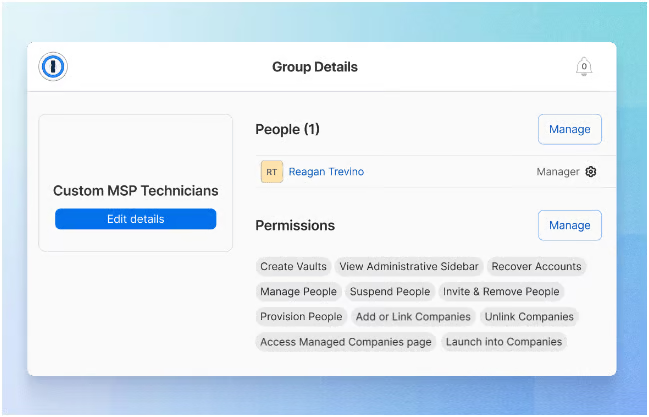
LastPass also provides role-based access controls that enable technicians and engineers to easily set org-wide credential policies, manage groups, and generate MSP reports.
Multi-Tenant client management
1Password offers client management with its dedicated MSP console, giving providers complete visibility and control over all their managed accounts.
The centralized dashboard allows technicians to add new or existing 1Password Business customers, configure security settings, and monitor credential activity from a single interface. Technicians can use their existing MSP login to access multiple client instances directly through the console as well.
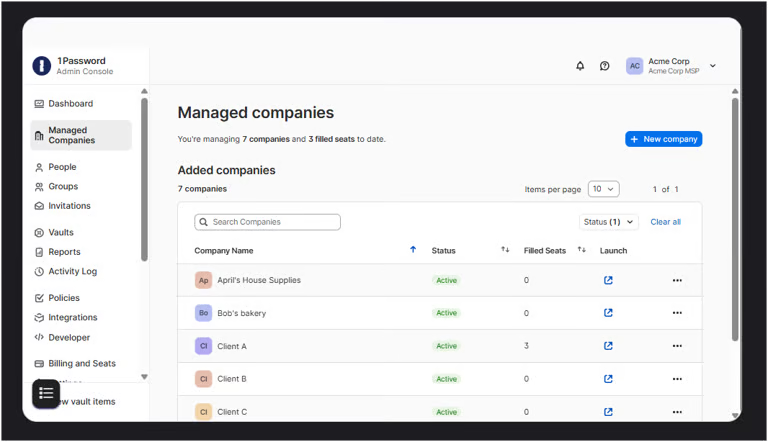
Each client environment opens in a new browser tab, making it easy to switch between accounts. Switching between managed client 1Password instances and your own MSP instance can be done simply by switching tabs.
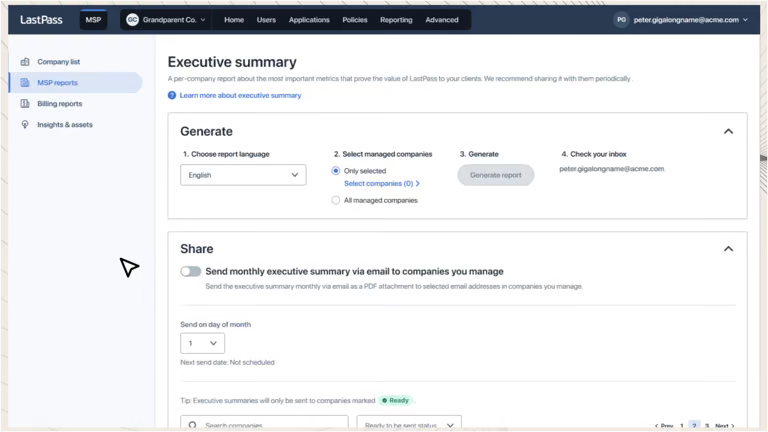
Meanwhile, LastPass for MSPs offers a multi-tenancy platform that enables providers to manage multiple clients from a single centralized dashboard. Administrators can deploy LastPass across several organizations using ready-to-use templates and customizable policies that adapt to each client’s security requirements.
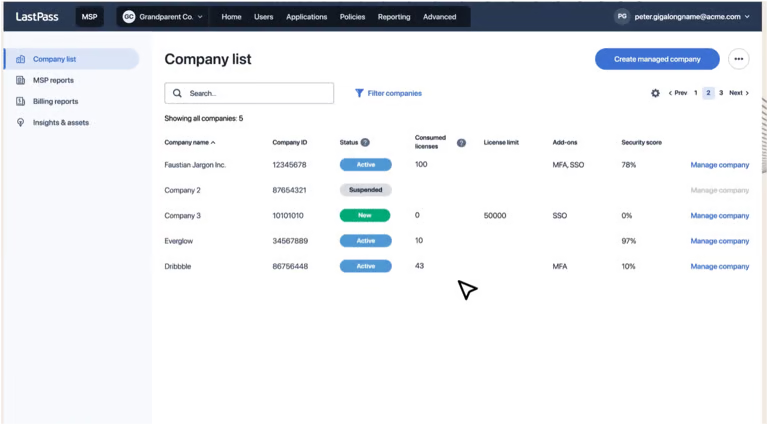
MSP technicians can oversee multiple independent tenants or company accounts within a single, isolated instance, ensuring that every client environment remains securely contained.
Each managed company retains all the features of a LastPass account — including multifactor authentication, directory integrations, federated login, and over 120 customizable security policies.
MSP support
1Password offers a comprehensive MSP Resource Center explicitly built to support service providers in deploying and managing their clients’ password security.
This center includes implementation guides, training videos, and enablement content designed to help technicians onboard customers efficiently.
MSPs also have access to detailed technical documentation covering everything from account setup to billing and client management.
On the other hand, LastPass provides MSPs with a dedicated MSP team to help providers grow and manage their client base effectively.
Its program includes a centralized Partner Portal that serves as a hub for technical assistance and case management. MSP partners have access to a specialized support team familiar with multi-tenant environments and client deployment needs.
The portal also houses localized marketing materials and educational resources, making it easier for MSPs to access the resources they need.
Channel Insiders: What partners say about 1Password vs LastPass
To get a clearer picture of how 1Password and LastPass fare in real-world environments, I reviewed discussions on third-party forums to gauge prevailing sentiment on their features, usability, and overall effectiveness as password management solutions for MSPs.
Reliability as a solution
In the MSP Reddit community, one user asked for advice on which password manager would be best for their company. In the thread, many users recommended 1Password, with one saying:
“1Password. It just works. And it’s the only SaaS that hasn’t been compromised. Now that they have a true MSP portal I see a big wave coming that way”
LastPass’ data breach
In another post within the r/MSP community, one user cited LastPass’s data breach incidents as a key reason for exploring alternative solutions.
“We stopped trusting LastPass after their breach—it wasn’t just the breach itself, but how they handled it that spoke to a deeper issue with their security culture.”
Extra features
In another MSP Reddit thread discussing password manager options, one user recommended 1Password, highlighting an added benefit for clients:
“Using 1Password, clients love it so far. Users also get a free family subscription for their own use which they love.”
Verdict: Password managers are crucial for MSPs
Password managers remain an essential tool for MSPs, helping protect client credentials, streamline access management, and reduce the risks tied to weak or reused passwords.
Regardless of which vendor you choose, integrating a dedicated password management platform in your tech stack is a key step toward protecting against modern threats and securing your organization.
In this comparison, I recommend choosing 1Password. While both options provide well-rounded password management capabilities for MSPs — including centralized dashboards, multi-tenant client management, and automated password protection tools — LastPass remains overshadowed by its 2022 data breach.
Despite LastPass introducing new security measures after the breach and now operating under a different parent company, the incidents have left a lasting mark on its reputation that may give prospective MSPs pause.
In contrast, 1Password has not experienced any major security breaches. It continues to be recognized as a reliable, user-friendly, and high-performing password management solution, thanks to its SRP technology, strong encryption, and extensive partner support resources.
Methodology
This comparison draws on vendor documentation and third-party user feedback to evaluate how 1Password and LastPass perform for MSPs.
It was developed using official product resources, partner program materials, and feedback from MSP professionals shared across community platforms.
This research-based approach ensures that each feature description reflects both the vendors’ stated capabilities and real-world user experiences.
Frequently Asked Questions (FAQs)
Does 1Password have any feature that hides vault data when traveling (e.g., for border checks)?
Yes. 1Password includes a “Travel Mode” feature that temporarily removes selected vaults from your devices, hiding sensitive data until you safely disable the mode.
Is 1Password still self-hostable or local-vault based?
No. 1Password has moved entirely to a cloud-based model and no longer supports self-hosted or standalone local vaults.
Did LastPass’ 2022 breach expose customer vaults?
Encrypted customer vaults were not exposed in plaintext, but attackers did copy backups containing vault data, including unencrypted metadata (such as URLs) alongside encrypted fields (usernames, passwords, secure notes).
This breach has prompted serious questions about LastPass’s incident response and security practices.