Channel Insider sought nominations from IT vendors, solution providers, and partners to highlight impactful collaborations. Check out our top choices here.
Video: How Rafay Systems Simplifies Hybrid Cloud & AI on AWS
Explore how Rafay Systems helps enterprises simplify hybrid cloud, Kubernetes, and AI workloads on AWS to improve governance, speed, and cost efficiency at scale.
Video: How Truly SMB Helps Small to Midsize Businesses Adopt AI
Truly SMB’s CEO and CTO on how small and mid-sized businesses can adopt AI using Microsoft Copilot and a “tech fit” approach focused on real business outcomes.
Video: Q4 and 2025 Annual IT Channel Recap: AI, VMware, Security & 2026 Outlook
A deep dive into the biggest IT channel stories of Q4 and all of 2025, including AI maturity, VMware and Broadcom changes, cybersecurity compliance, tech layoffs, and expert predictions for 2026.
Video: Grammarly Rebrands as Superhuman, Launches Superhuman Alliance Partner Program
Superhuman introduces itself as a unified AI productivity platform and launches the Superhuman Alliance partner program, outlining how partners can drive AI adoption, workflow automation, and measurable business outcomes.
Video: How Data41 Uses AI to Transform Life Sciences & Social Good
Data41 founder Hans Mize explains how AI is transforming life sciences and social services, helping organizations deliver faster, more human-centered outcomes.
Channel Insider sought nominations from IT vendors, solution providers, and partners to highlight impactful collaborations. Check out our top choices here.
Video: How Rafay Systems Simplifies Hybrid Cloud & AI on AWS
Explore how Rafay Systems helps enterprises simplify hybrid cloud, Kubernetes, and AI workloads on AWS to improve governance, speed, and cost efficiency at scale.
Video: How Truly SMB Helps Small to Midsize Businesses Adopt AI
Truly SMB’s CEO and CTO on how small and mid-sized businesses can adopt AI using Microsoft Copilot and a “tech fit” approach focused on real business outcomes.
Video: Q4 and 2025 Annual IT Channel Recap: AI, VMware, Security & 2026 Outlook
A deep dive into the biggest IT channel stories of Q4 and all of 2025, including AI maturity, VMware and Broadcom changes, cybersecurity compliance, tech layoffs, and expert predictions for 2026.
Video: Grammarly Rebrands as Superhuman, Launches Superhuman Alliance Partner Program
Superhuman introduces itself as a unified AI productivity platform and launches the Superhuman Alliance partner program, outlining how partners can drive AI adoption, workflow automation, and measurable business outcomes.
Video: How Data41 Uses AI to Transform Life Sciences & Social Good
Data41 founder Hans Mize explains how AI is transforming life sciences and social services, helping organizations deliver faster, more human-centered outcomes.
Channel Insider content and product recommendations are
editorially independent. We may make money when you click on links
to our partners.
Learn More
Help desk tools give MSPs a structured way to manage client support from a single platform, helping teams track issues and meet service expectations.
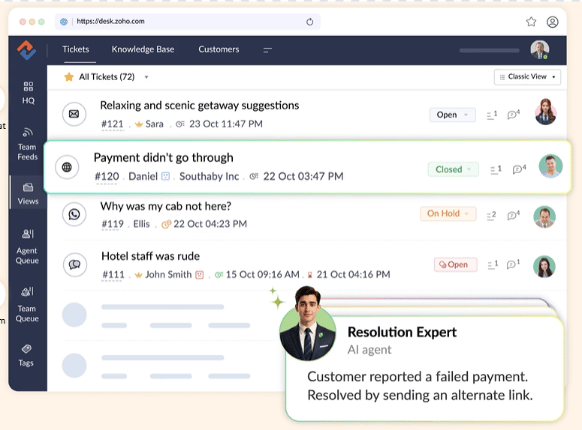
The best solutions combine strong ticketing, multi-channel support, and SLA management, alongside an intuitive user interface.We evaluated several leading options using a defined set of criteria to help you choose the right tool for your MSP. Ultimately, we rank ZohoDesk as our top choice overall for its affordable plans and customization options.
Help desk software for MSPs is a multi-client platform that centralizes support across customers, offering automated ticketing, issue tracking, SLA management, reporting, and other IT-focused capabilities.
Unlike internal IT or generic customer support tools, it supports client-specific workflows, strict service-level tracking, and integrations with PSA and RMM systems to manage service delivery at scale.
Advertisement
How MSP help desk software works
While help desk platforms include many features, several solutions are built around three core workflows:
Ticket intake across channels (email, portal, chat, Teams): Captures and organizes requests from all channels in one place for faster, consistent responses.
Automated triage, routing, and prioritization: Automatically categorizes tickets and prioritizes them based on urgency and impact.
SLA tracking and escalation: Monitors service performance against SLA timelines and triggers alerts or escalations when tickets risk breaching agreed service levels.
Note: All per-user prices are based on a one-year commitment unless otherwise noted.
Featured Partners: Managed Service Provider (MSP) Software
We are able to offer our services for free because some vendors may pay us for web traffic or other sales opportunities. Our mission is to help technology buyers make better purchasing decisions, so we provide you with information for all vendors — even those that don't pay us.
Micro (0-49), Small (50-249), Medium (250-999), Large (1,000-4,999), Enterprise (5,000+)
Core Features
Integrations
Top Help Desk software comparison
To quickly grasp what top features each vendor delivers, here’s how they compare across ticketing, AI and automation, customer portals, reporting, and starting prices.
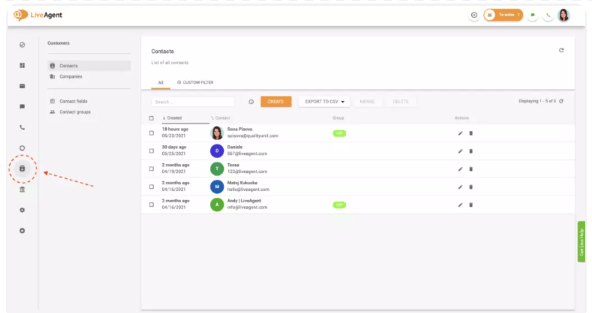
LiveAgent offers a blend of extensive customization options and a highly intuitive user interface. It’s easy to deploy, allowing support agents to get up and running quickly so they can focus on client issues.
This focus on usability is illustrated by features like proactive chat invitations, which invite visitors to chat only when there are enough agents available to engage in conversation.
While LiveAgent is user-friendly, its customer support can be inconsistent, and its EU-based tech support may be a drawback for some MSPs. For an alternative that combines ease of use with strong customization and support, consider ManageEngine ServiceDesk Plus.
LiveAgent is best for MSPs that prioritize quick setup, minimal training, and a straightforward support experience.
LiveAgent key features
Live chat: Use real-time chat widgets to provide support for website visitors and customers.
Ticketing: Gather and manage communications from all channels to resolve customer queries.
Performance analytics: Measure data to track agent performance and customer satisfaction.
Mobile application: Handle customer requests on the go using Android and iOS applications.
ManageEngine ServiceDesk Plus: Best for reporting and dashboards
Overall Rating: 4.2/5
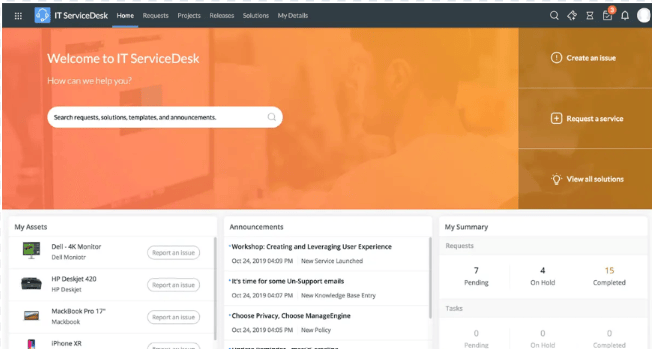
ManageEngine ServiceDesk Plus is an all-in-one service desk solution that provides customizable reports and dashboards to help enterprise users track their help desk’s health.
Its native reporting tools support data-driven insights, including inventory reporting with custom, query-based, and preconfigured report options for key metrics. It also offers interactive dashboards that let teams combine multiple reports into a single view.
Even though ManageEngine is thorough and highly customizable, it’s not the easiest to use. For a similar feature set with a more user-friendly experience, consider Freshdesk.
SolarWinds ServiceDesk is a cloud-based service desk solution with a variety of automation features to maximize productivity, along with transparent, flexible pricing.
Although many tools on this list have additional fees, SolarWinds ServiceDesk’s pricing structure is clear: prices are laid out upfront with no hidden costs, allowing businesses to easily understand what they’re paying for and why. This makes budgeting more straightforward and more predictable for MSPs.
While it’s transparently priced, SolarWinds ServiceDesk’s customization options could use improvement. Consider Zoho Desk if you seek greater customization.
SolarWinds is for businesses that want a help desk solution with transparent and flexible pricing.
SolarWinds key features
Automated ticketing: Automate ticket classification, routing, and correlation capabilities.
Automated workflows: Streamline ticket resolution with automated processes.
Dashboards: Observe the current state of your service desk through ServiceDesk’s real-time snapshots.
Customizable reports: Generate custom reports based on your service desk team’s needs.
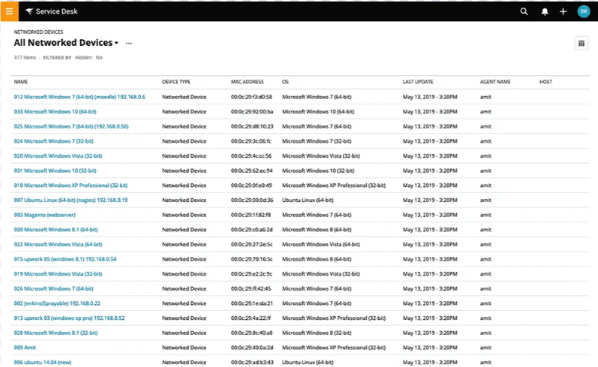
Asset inventory in SolarWinds ServiceDesk. Image: SolarWinds
Freshdesk is a cloud-based help desk software that offers a comprehensive set of features suitable for businesses of all sizes. It shines through its range of features, including integrated ticketing, 24/7 email support, and a knowledge base, all available in its free tier.
But you’d have to upgrade to paid plans for features like automation, custom roles, objects and dashboards, customer journeys, community forums, and extendable API limits.
Despite this, Freshdesk is not as integrable as other tools on this list. For a tool with an extensive feature set, high customization, and more integration options, check out Zoho Desk.
MSPs that need both core and advanced features in their help desk software should consider Freshdesk.
With its robust multichannel communication capabilities and strong customization options, MSPs that handle multiple customers can benefit from Freshdesk’s offerings.
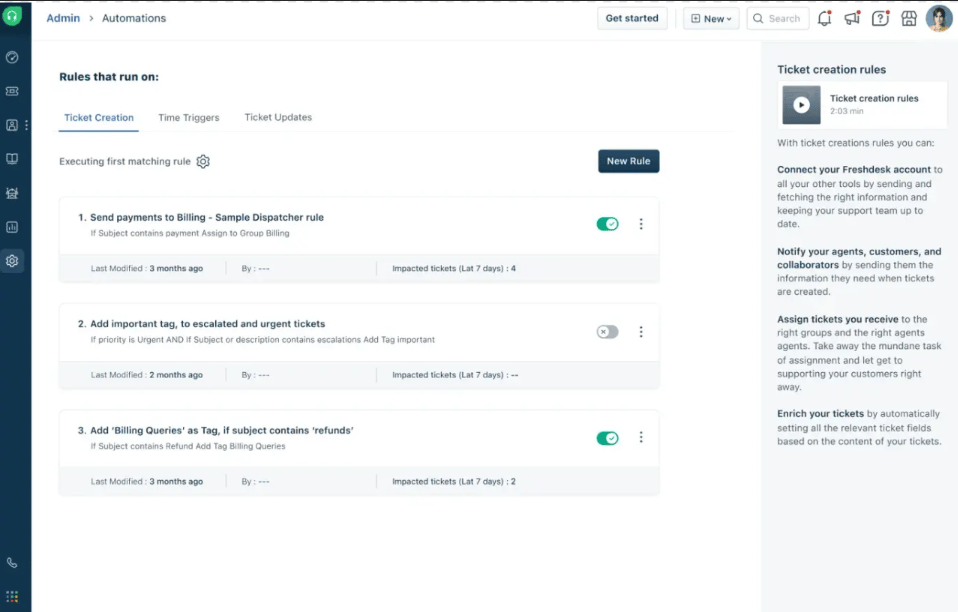
Ticket field suggester: Automatically propose ticket fields to segment, prioritize, and route incoming tickets.
Omnichannel support: Manage and unify support across email, chat, and social media on a single platform.
Chatbot: Use a chatbot powered by Freddy AI to provide instant and accurate responses to customers.
Portal customization: Leverage full CSS customization to tailor the look of your support portal.
Automations dashboard in Freshdesk. Image: Freshworks
Freshdesk pros and cons
Pros
Cons
Very customizable tool
Limited integrations
Strong ticketing system
Not the easiest to use
Robust reports
No 24/7 support
Intercom: Best for AI-enhanced support
Overall Rating: 4/5
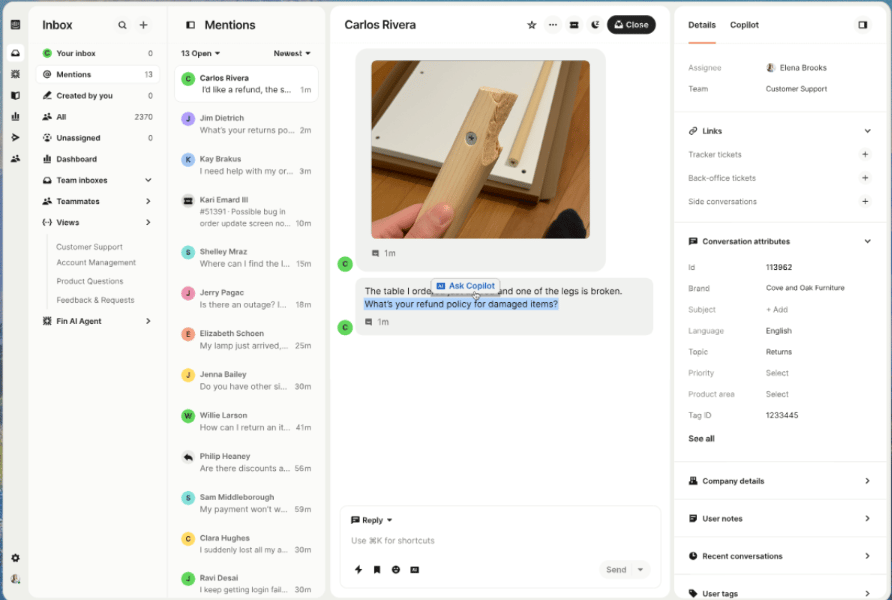
Intercom enables MSPs to leverage AI-enhanced support capabilities, enabling their support teams to work and collaborate more efficiently. It does this through features like automated customer engagement, real-time chat support, and targeted communication.
Its AI-driven chatbots stand out by handling frequently asked questions and routing issues to the appropriate support agents, elevating the overall user experience for both customers and service teams.
On the flipside, Intercom’s customer service isn’t as highly rated as some other tools on this list. For a platform that offers better customer service, check out SolarWinds ServiceDesk.
Intercom is best for MSPs that want to use AI to enhance customer support. It is especially suitable for tech-savvy teams looking to streamline responses, handle high ticket volumes, and deliver more personalized customer experiences through automation.
Intercom key features
AI bots: Leverage AI-powered chatbots to automate your initial customer interactions.
Omnichannel support: Access channels like live chat, WhatsApp, phone, and email via Intercom’s inbox.
Workflows: Use Intercom’s visual builder to automate team workloads with bots, SLAs, and more.
No-code customization: Use tools in a single workspace to manage multiple help centers.
Intercom is a help desk platform that enables MSPs to leverage AI-enhanced support capabilities so that their support teams work and collaborate more efficiently. It does this through features like automated customer engagement, real-time chat support, and targeted communication. Its AI-driven chatbots in particular stand out as they can handle tasks like answering frequently asked questions and routing issues to the appropriate support agents, which results in elevating the overall user experience of both custom
How to choose MSP help desk software
There are several key factors to consider when choosing MSP help desk software, especially since the right platform needs to support multiple clients, SLAs, and recurring service delivery. The most important areas to evaluate include:
Core features
Assess the essential features, such as ticket and issue tracking, multichannel communication, and AI-driven automation. These are the backbone of any help desk software and are crucial for efficient service management.
Customization
Consider the level of customization the software offers. This includes customizable dashboards, reports, roles, and permissions. Tailoring the software to your unique workflows can significantly enhance its effectiveness.
Integration and compatibility
Check the software’s compatibility with your existing tools and platforms. Seamless integration with RMM, PSA, and other essential software is vital for maintaining a cohesive IT environment.
Cost and pricing structure
Evaluate the software’s pricing transparency, the availability of flexible or modular pricing plans, and any additional costs associated with integrations or add-ons. Ensure the solution fits within your budget without compromising essential features.
Customer support
Reliable customer support is essential. Look for software that offers 24/7 support through multiple channels, including live chat, phone, and email. High-quality support will make a significant difference when issues arise.
User interface
The software should be intuitive and easy to set up, especially if your team has limited technical expertise. A user-friendly interface reduces the learning curve and increases productivity.
Scalability
Choose software that can grow with your business. As your MSP expands, the help desk software should be able to handle increased ticket volumes, additional clients, and more complex workflows without performance degradation.
Bottom line: Invest in the right helpdesk service
Having the right help desk solution can help reduce disjointed operations and manual processes, while improving client satisfaction through more efficient, standardized workflows.
Whether you need advanced automation, SLA tracking, improved ticketing systems, or customizable reporting, help desk software tailored to your MSP helps you manage issues more effectively so your team can stay focused on business goals first and foremost.
How we evaluated the best help desk tools
To determine the best help desk software for MSPs, we evaluated several tools across six weighted scoring categories. We then assigned primary use cases to the six tools with the highest scores. Among the top six, the tool with the highest average score across the six categories was our winner.
Below is a brief summary of our criteria:
Core Features (25%): We analyzed the key features of help desk tools, including ticket management, automation, reporting, and more.
Cost (20%): We reviewed pricing models, free trials, additional fees, and pricing transparency to understand the financial commitment.
Customer Support (15%): We took stock of the support channels, their availability, and the quality of service to gauge how well you’d find help in times of need.
Ease of Use (15%): The bulk of assessments here was based on how verified users rated the overall user experience.
Customization (15%): We evaluated the extent to which each tool allows personalization, including custom fields and statuses, as well as branding elements.
Integration & Compatibility (10%): Lastly, we considered how each tool integrates with other software solutions and its adaptability across various platforms.
Frequently asked questions about MSP help desk software
Why do MSPs need help desk software?
MSPs need help desk software to efficiently manage the IT support services they provide to their clients. They enable MSPs to track and resolve issues, manage service requests, and ensure that all customer interactions are handled systematically.
The software also provides tools to automate routine tasks, monitor SLAs, and generate reports.
How is MSP help desk software different from traditional help desk tools?
MSP help desk software is designed for external, multi-client service delivery, often using a multi-tenant architecture and automation to efficiently manage multiple customer environments.
Traditional help desks are typically built for a single internal organization, with less emphasis on client segmentation, MSP workflows, and integrations across an MSP tool stack.
Is cloud-based or on-prem help desk software better for MSPs?
Cloud-based help desks are often easier to deploy and maintain, and they can scale quickly as distributed teams and client bases grow.
On-prem can be a better fit for MSPs with strict data residency or regulatory constraints, but it usually requires more internal resources for upkeep and security.
What types of MSPs benefit most from AI-powered help desks?
MSPs with high ticket volume, limited staffing, or many repetitive requests benefit most from AI as these technologies can work well in assisting with triage, routing, summarization, and deflection.
AI-powered workflows are also helpful for MSPs focused on improving response times and scaling service without adding headcount at the same rate.
What kinds of software do MSPs need?
Beyond help desk software, MSPs typically rely on remote monitoring and management (RMM) and professional services automation (PSA) tools to monitor client environments and manage day-to-day business operations.
They also use backup and disaster recovery (BDR), security and patch management software, plus collaboration and communication tools to protect systems and support efficient work with clients and internal teams.
This article was originally published by Collins Ayuya in August 2024 and updated by Luis Millares in January 2026 to reflect the latest pricing information and other relevant changes.
Collins is a writer for Channel Insider with over seven years of experience in tech industry. His tech and channel articles reflect his specialties in AI, cybersecurity, cloud computing, embedded systems, and the Internet of things (IoT). Collins has a bachelor’s degree in telecommunications and IT and is currently earning his master’s in computer science. He also has a particular interest in the startup world, having worked as a head of product overseeing sales and eventually founding his own tech startup.
A deep dive into the biggest IT channel stories of Q4 and all of 2025, including AI maturity, VMware and Broadcom changes, cybersecurity compliance, tech layoffs, and expert predictions for 2026.
Channel Insider combines news and technology recommendations to keep channel partners, value-added resellers, IT solution providers, MSPs, and SaaS providers informed on the changing IT landscape. These resources provide product comparisons, in-depth analysis of vendors, and interviews with subject matter experts to provide vendors with critical information for their operations.
Advertiser Disclosure: Some of the products that appear on
this site are from companies from which TechnologyAdvice
receives compensation. This compensation may impact how and
where products appear on this site including, for example,
the order in which they appear. TechnologyAdvice does not
include all companies or all types of products available in
the marketplace.