














NinjaOne RMM is a cloud-based remote monitoring and management platform designed for managed service providers (MSPs) and internal IT teams managing distributed endpoints. Formerly known as NinjaRMM, the platform combines endpoint monitoring, patch management, automation, scripting, alerting, and remote access in a centralized console.
Our assessment finds NinjaOne particularly well suited to MSPs and IT teams that prioritize ease of use, automation, patch management, and customer support. It can also appeal to organizations looking to consolidate endpoint operations, as NinjaOne now offers capabilities such as mobile device management, backup, documentation, and vulnerability management.
The main tradeoffs are pricing and fit. NinjaOne publishes an approximate per-endpoint range, but buyers still need a custom quote for exact costs. Organizations with specialized technology stacks should verify that required integrations are supported before purchasing.
- Is NinjaOne RMM worth it?
- NinjaOne RMM Review: What You Need to Know
- NinjaOne pros and cons
- NinjaOne RMM evaluation by capability
- Who should use NinjaOne RMM?
- Who shouldn’t use NinjaOne RMM?
- NinjaOne Pricing
- Key features of NinjaOne RMM
- NinjaOne RMM ease of use and setup
- NinjaOne RMM customer service
- If NinjaOne RMM isn’t ideal for you, check out these alternatives
- Bottom line: Built for ease of use and automation
- How we evaluated NinjaOne RMM
Is NinjaOne RMM worth it?
NinjaOne RMM is a strong option for MSPs and IT teams that want an easy-to-use platform for endpoint monitoring, patch management, automation, scripting, and remote support. Its biggest strengths are usability, automation, patching, and customer support. Its main drawbacks are quote-based pricing and the need to verify support for specialized integrations.
For MSPs managing distributed endpoints and looking to reduce repetitive technician work, NinjaOne is particularly worth considering.
NinjaOne RMM Review: What You Need to Know

- Best for: Ease of use and IT automation
- Pricing: Approximately $1.50 to $3.75 per endpoint per month based on published volume ranges; exact pricing requires a quote
- Free trial: 14 days
- Deployment: NinjaOne says most users are fully operational in less than one week
- Supporting operating systems: Windows, macOS, and Linux
NinjaOne pros and cons
| Pros | Cons |
|---|---|
| User-friendly interface | Exact pricing requires a quote |
| Strong IT automation capabilities | Some capabilities depend on additional NinjaOne products |
| Highly rated customer support | Specialized integrations should be verified before purchase |
| Broad patching and endpoint management support | Broader platform may be more than smaller teams need |
NinjaOne RMM evaluation by capability
| Capability | What NinjaOne offers | Key consideration |
| Remote monitoring | Real-time endpoint health and performance monitoring with more than 100 monitoring conditions. Alerts can trigger scripts, service restarts, ticket creation, and other automated remediation. | Strong fit for teams that want monitoring and remediation connected in the same workflow. |
| IT automation | Policy-based and scheduled automation for patching, application management, drive encryption, maintenance, remediation, and custom scripts across Windows, macOS, and Linux. | Particularly useful for MSPs looking to standardize repetitive tasks across customers and endpoints. |
| Patch management | Automated patch identification and deployment across Windows, macOS, Linux, and supported third-party applications, with controls for approvals, schedules, and reboots. Patch Intelligence AI summarizes Windows patches and known issues. | Broad cross-platform support is a strength, but administrators still need appropriate patch policies and oversight. |
| Endpoint management | Centralized monitoring, patching, scripting, alerting, remote access, security controls, and other endpoint workflows. NinjaOne’s broader platform also includes MDM and additional device-management capabilities. | Organizations should determine which capabilities are included in the products they purchase rather than assuming every NinjaOne feature is part of RMM. |
| Endpoint security | RBAC, device approval, encryption and credential management, agent uninstall protection, vulnerability management, and integrations with security platforms including CrowdStrike, SentinelOne, and Bitdefender. | NinjaOne provides security management capabilities but also relies on integrations with dedicated security products for parts of the security stack. |
| Asset discovery and visibility | Centralized visibility into managed devices, endpoint health, system events, and other device information through the NinjaOne console. | The current review supports endpoint visibility more strongly than a detailed assessment of dedicated asset-discovery capabilities. |
| ITSM and ticketing | Monitoring alerts can automatically generate tickets, helping connect endpoint events with technician workflows. | The current review does not establish NinjaOne RMM as a full standalone ITSM or PSA replacement, so buyers needing broader service-management functionality should evaluate those requirements separately. |
| MSP use | Multi-endpoint monitoring, automation, scripting, patching, remote support, alerting, and broader endpoint-management capabilities designed to reduce repetitive technician work. | Especially relevant to MSPs managing large or distributed endpoint environments; quote-based per-endpoint pricing should be evaluated against fleet size and technician economics. |
Who should use NinjaOne RMM?
NinjaOne RMM is a strong fit for MSPs and internal IT teams that want to simplify endpoint monitoring and management without sacrificing automation. Its centralized interface brings together monitoring, patching, scripting, alerting, and remote support, making it particularly useful for teams managing large or distributed endpoint environments.
Organizations looking to consolidate more of their endpoint operations may also benefit from NinjaOne’s broader platform, which now includes capabilities such as mobile device management, backup, documentation, remote access, and vulnerability management.
NinjaOne may also appeal to teams that prioritize onboarding and support. The company provides 24/7 support and says most users become fully operational in less than one week.
Who shouldn’t use NinjaOne RMM?
NinjaOne may be less suitable for organizations that want to know their exact software costs before contacting a vendor. Although NinjaOne now publishes a general per-endpoint pricing range, final pricing still depends on endpoint volume, region, products purchased, promotions, and other factors.
Organizations with highly specialized technology stacks should also confirm that their required third-party integrations are supported.
NinjaOne Pricing
NinjaOne publishes more pricing information than it did when this review was originally written, although buyers still need to request a quote for their exact costs. For commercial, non-FedRAMP customers, NinjaOne’s published pricing range is:
- $1.50 per endpoint per month at 10,000 endpoints
- $3.75 per endpoint per month for 50 or fewer endpoints
Volume discounts lower the per-device cost as the number of managed endpoints increases. Final pricing can also vary based on region, products purchased, promotions, incentives, and contractual commitments.
NinjaOne says it does not charge separate implementation or support fees and includes free, unlimited support. Buyers can also try or evaluate the platform before purchasing:
- Free trial: 14-day RMM trial
- Demo: Product demonstrations are available on request
Because final pricing depends on an organization’s deployment and product mix, prospective buyers still need to contact NinjaOne for a custom quote.
Key features of NinjaOne RMM
Remote monitoring and automated remediation
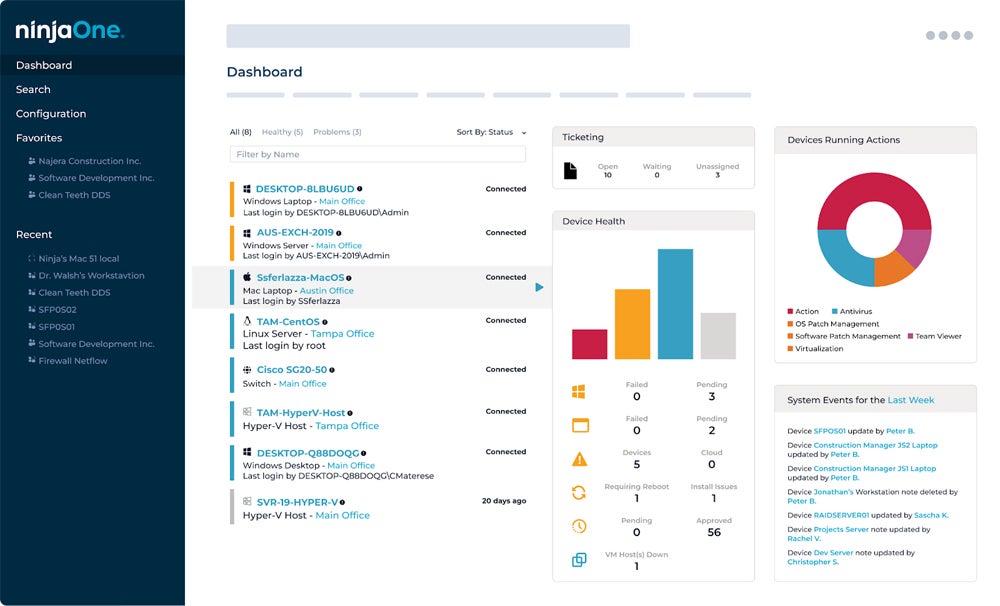
NinjaOne provides real-time monitoring of endpoint health and performance, giving technicians centralized visibility into managed devices and potential issues.
Administrators can create alert policies based on more than 100 monitoring conditions, including resource usage, service failures, and other endpoint events. Alerts can also trigger automated remediation actions such as restarting services, running scripts, or generating tickets, allowing some common issues to be addressed without manual technician intervention.
Patch management
NinjaOne automates patch identification and deployment across Windows, macOS, and Linux environments, as well as for supported third-party applications. Administrators can use policies to control patch approvals, schedules, reboots, and other deployment settings across managed endpoints.
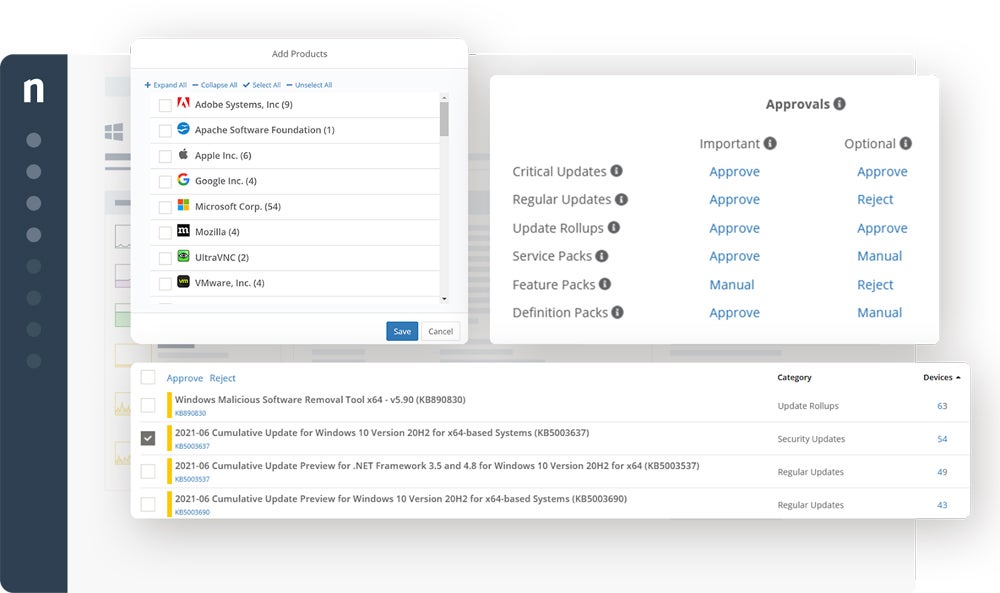
NinjaOne has also added Patch Intelligence AI for Windows OS patches. The feature uses generative AI, third-party information, and anonymized NinjaOne telemetry to summarize patches and identify known issues that administrators may want to consider before deployment.
Alerts and notifications
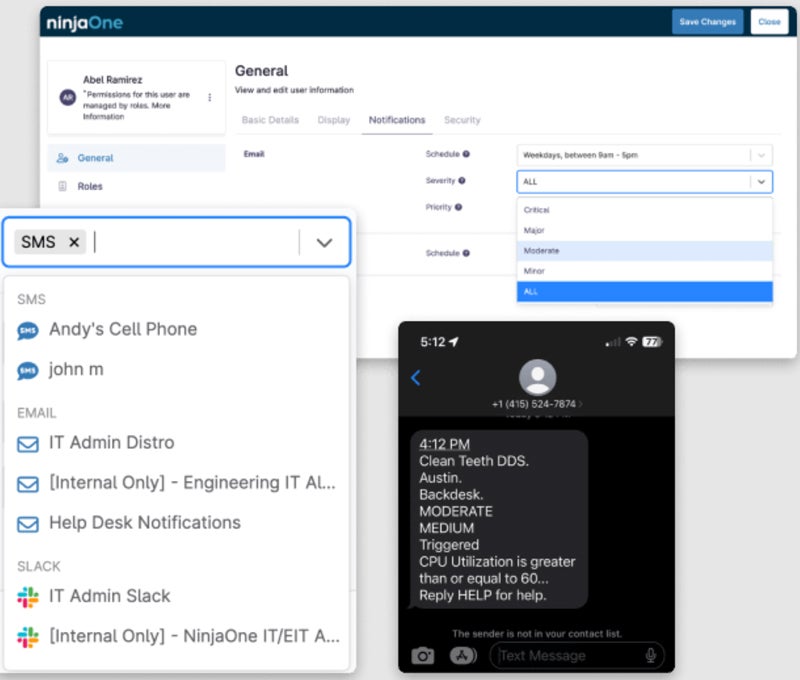
NinjaOne allows IT teams to create custom alerting policies for endpoint conditions and route notifications via channels such as email, SMS, Slack, Microsoft Teams, PagerDuty, and webhooks.
The platform supports more than 100 monitoring conditions and lets administrators use prebuilt or custom monitoring templates across devices. Alerts can also trigger automated responses, including scripts, service restarts, and ticket creation, helping teams move from simply detecting issues toward automatically remediating common problems.
Security management
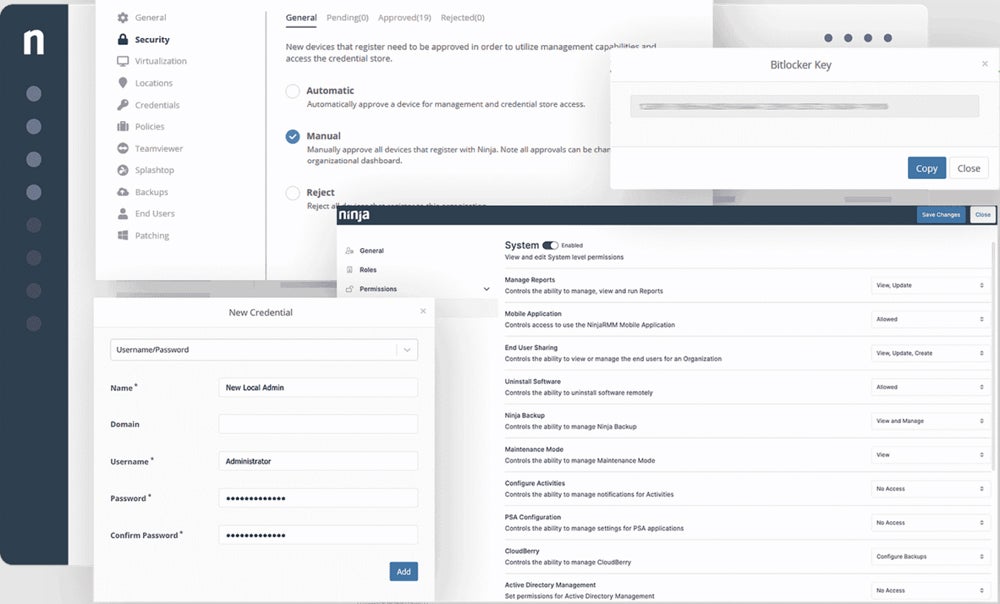
NinjaOne includes endpoint security controls such as role-based access control (RBAC), device approval, encryption management, credential management, and support for managed security tools. Administrators can also restrict users from uninstalling the NinjaOne agent, helping maintain management coverage across endpoints.
NinjaOne integrates with dedicated security platforms, including CrowdStrike, SentinelOne, and Bitdefender, and has expanded its platform to include vulnerability management to help teams identify and remediate endpoint vulnerabilities.
Automation and scripting
NinjaOne provides several ways to automate repetitive endpoint management tasks, including software patching, application management, drive encryption, maintenance, remediation, and custom scripting.
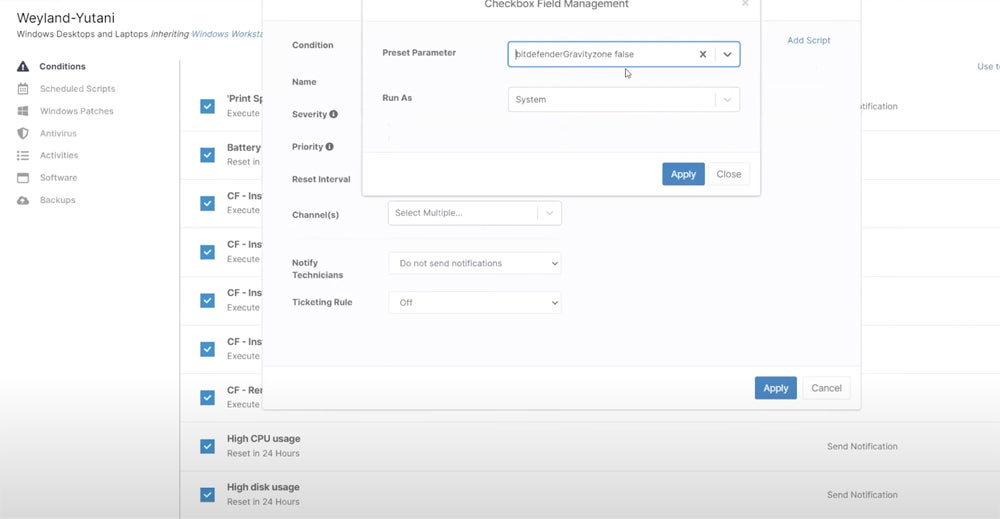
Technicians can run automations on demand, schedule them, or trigger them through policies and endpoint conditions. The platform supports scripting across Windows, macOS, and Linux, allowing teams to reuse automations across devices and organizations to standardize common IT tasks.
NinjaOne RMM ease of use and setup
Ease of use remains one of NinjaOne’s strongest differentiators. Its centralized interface brings monitoring, patching, automation, remote access, and other endpoint management workflows into a single console, reducing the need for technicians to switch between separate tools for common tasks.
NinjaOne says most users are fully operational in less than one week and that learning common NinjaOne tasks takes less than three hours on average. Those figures are vendor-reported and will vary depending on the size and complexity of an organization’s environment.
Recent user reviews also continue to frequently highlight NinjaOne’s interface, automation, remote management, and ease of deployment as strengths.
NinjaOne RMM customer service
NinjaOne provides 24/7 customer support, along with onboarding and training resources. The company says its support teams respond in under 30 minutes on average and reports maintaining a 98% customer satisfaction score for more than five years.
I found that even signing up for its live demo feels personal and speedy, as an agent reached out to me to understand my pain points, current stack, and general interest in NinjaOne, ensuring I get an introduction to the product as intuitive as possible. Part of its comprehensive onboarding support includes extensive training and assistance at no additional cost, making it easy for new users to adapt quickly and fully utilize the platform.
If NinjaOne RMM isn’t ideal for you, check out these alternatives
Atera

Atera combines RMM with PSA and other IT management capabilities but uses a per-technician pricing model rather than NinjaOne’s per-device approach. Each technician license can manage an unlimited number of customers and devices, which can make its pricing model particularly worth comparing for MSPs managing large endpoint fleets with relatively small technician teams.
Pulseway

Pulseway stands out for its mobile-first approach to remote monitoring and management. Its mobile app lets technicians monitor endpoints, receive actionable alerts, run scripts and automation workflows, and remotely connect to devices from iOS or Android.
ConnectWise

ConnectWise is worth considering for MSPs seeking a broader operations ecosystem that integrates RMM with PSA, remote access, cybersecurity, automation, billing, backup, and other managed services workflows. ConnectWise has continued to consolidate those capabilities across its broader platform, making it particularly relevant for providers who want RMM closely connected to the rest of their service delivery stack.
Bottom line: Built for ease of use and automation
NinjaOne remains a strong RMM option for MSPs and IT teams that prioritize ease of use, automation, patch management, remote access, and customer support. Its broader platform has also expanded considerably, giving organizations more options to consolidate endpoint management, backup, documentation, vulnerability management, and other IT workflows.
Pricing is more transparent than it was when this review was originally published, but buyers still need a custom quote to determine their exact costs. Organizations with specialized integration requirements should also confirm that the tools in their technology stack are supported before committing.
How we evaluated NinjaOne RMM
We evaluated NinjaOne RMM across six areas that are likely to influence purchasing decisions for MSPs and IT teams: core RMM features, cost, integrations, automation, ease of use, and customer support.
Our evaluation considered capabilities such as remote monitoring, patch management, alerting, remote access, endpoint management, security controls, automation and scripting, pricing transparency, third-party integrations, setup experience, and available support resources.
We also reviewed current product documentation, vendor information, and third-party user feedback to account for changes to NinjaOne since this review was originally published.
This article was originally published in August 2024 and was updated in October 2026 for accuracy and freshness.nterprise organizations.