












Remote monitoring and management (RMM) software is an IT management solution that allows MSPs to remotely monitor, manage, and maintain client IT environments. They provide visibility into device health and performance, help teams identify and proactively address issues, and streamline day-to-day IT operations.
The best RMM software platforms typically include core features such as remote monitoring, patch management, alerts and notifications, and automation and scripting.
We reviewed the top RMM tools for 2026 to help you find the right solution for your MSP’s operational needs, budget, and goals.
- Top RMM software comparison
- Atera: Best overall RMM software
- NinjaOne: Best for ease of use
- Pulseway: Best for RMM via mobile
- Datto: Best for data protection
- ConnectWise: Best for integrated security
- Key feature to look for in RMM software
- Bottom line: choosing the best RMM software in 2026
- How we evaluated the best RMM software
- Frequently asked questions (FAQs)
Top RMM software comparison
| Remote Monitoring | Patch management | Automation and scripting | Starting price | |
|---|---|---|---|---|
| Atera | Yes | Yes | Yes | $149 per month per technician (billed annually) |
| NinjaOne | Yes | Yes | Yes | Contact for quote |
| Pulseway | Yes | Yes | Yes | Contact for quote |
| Datto | Limited | Yes | Yes | Contact for quote |
| ConnectWise | Yes | Yes | Yes | Contact for quote |
Atera: Best overall RMM software

Overall rating: 4.6/5
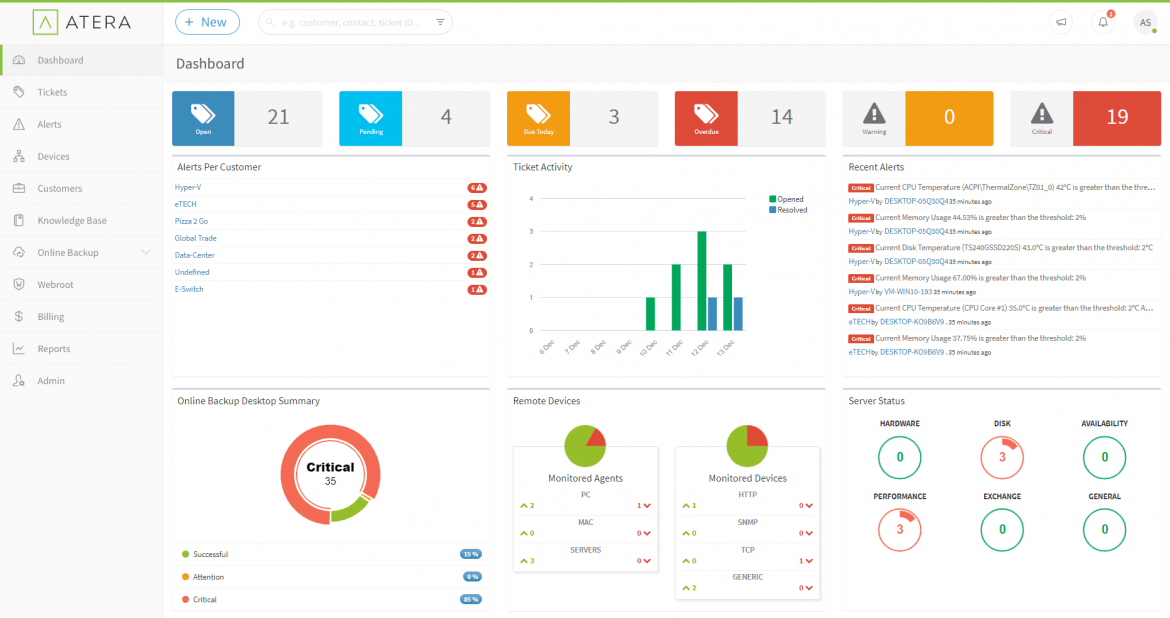
Atera, our top-rated overall RMM software, is an all-in-one cloud-based solution that delivers visibility and control over your MSP’s IT management. The platform offers a range of tools, including remote access, patch management, and IT automation, all within an intuitive interface.
Atera’s pricing is also transparent and competitive. It also offers backup and recovery features, though they are only available to subscribers of its two highest pricing tiers.
Although Atera is the top RMM pick, its integration options aren’t the most extensive.
Atera Features
- Remote access and support: Remotely access and manage devices.
- Patch management: Automate patch updates.
- IT automation: Set rules and streamline repetitive tasks and processes.
- Reporting: Get insights into IT infrastructure health and performance.
Atera Pricing
- IT department pricing: Starts from $149 per month per technician, when billed annually.
- MSP pricing: Starts at $129 per technician per month when billed annually.
- Free Trial: 30 days.
Atera pros and cons
| Pros | Cons |
|---|---|
| Transparent pricing | Few integrations |
| Easy to use | Limited mobile app functionality |
| Robust remote access | UI could be more intuitive |
NinjaOne: Best for ease of use
Overall rating: 4.3/5
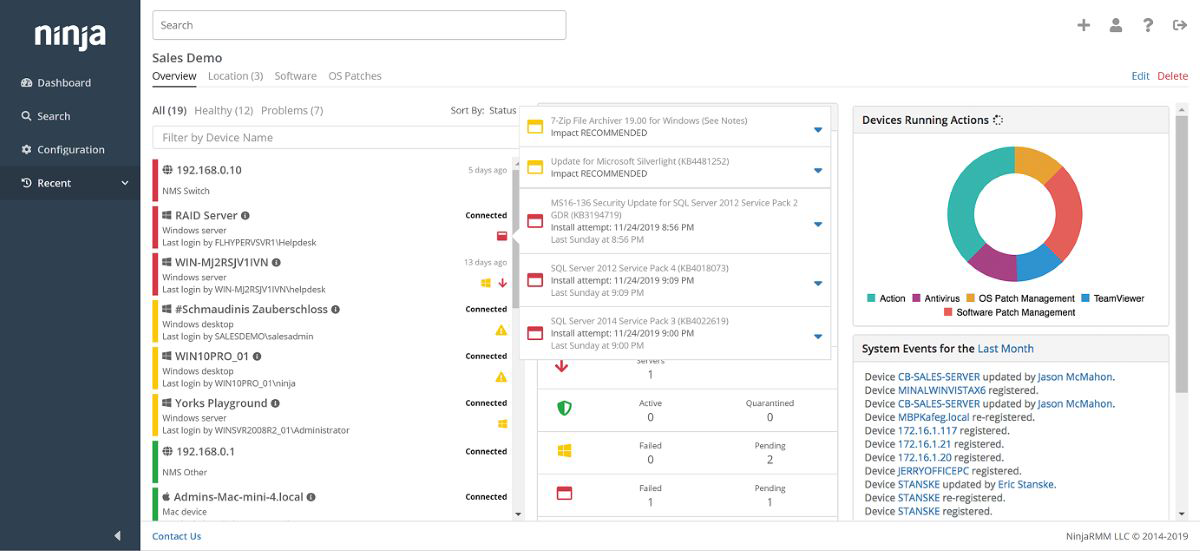
NinjaOne is intuitive RMM software that manages client endpoints at scale with a standout user-friendly interface, making it popular among MSPs that prioritize ease of use. It has a single interface that centralizes actions and unifies device management.
Since it’s easy to navigate, NinjaOne is quick to set up with a straightforward onboarding process. Its automation features, like automated patching, automated tasks, and auto-remediation, make it even more intuitive.
While NinjaOne has great automation features, you do have to contact them for a custom pricing quote.
NinjaOne Features
- Auto-remediation: Automate the detection and resolution of endpoint issues.
- One-click device actions: Carry out tasks without interrupting end users.
- Task and software automation: Automate your complex software installations.
- Self-service portal: Manage remote access and ticket management tasks.
NinjaOne Pricing
- Contact for quote: Pay-per-device pricing available.
- Free trial: Contact for length.
NinjaOne pros and cons
| Pros | Cons |
|---|---|
| User-friendly design | No public pricing information |
| Robust automation features | Limited customization |
| Quick setup | Basic reporting system |
Pulseway: Best for RMM via mobile
Overall rating: 4.2/5
Pulseway is RMM software that stands out in the market with its mobile-first approach, allowing MSPs to manage and monitor IT systems from their mobile devices.
This real-time monitoring tool sends customizable alerts directly to your phone, keeping you on top of things. It also allows you to auto-remediate issues, so you don’t have to find a computer to handle IT issues.
Pulseway also offers easy deployment features to get up and running quickly.
However, though clearly outlined, its additional costs can make the product expensive.
Pulseway Features
- Mobile RMM: Manage and monitor IT systems directly from a mobile device.
- Real-time alerts: Get instant notifications about system and endpoint issues.
- Pulseway automation workflows: Execute automated tasks from your phone.
- Discovery and deployment: See all your IT endpoints and mass-deploy Pulseway.

Pulseway Pricing
- Per-device pricing: Contact for price quotation.
- Free trial: Contact for length
Pulseway pros and cons
| Pros | Cons |
|---|---|
| Quality mobile app | Customer support could improve |
| Real-time alerting | Only basic security training |
| Easy to deploy | Has additional costs |
Datto: Best for data protection
Overall rating: 4/5
Datto is a cloud-based RMM platform that prioritizes data protection through a blend of flexible patch management, monitoring, ransomware detection, and rapid remote access and support.
Datto provides reliable backups, ensuring that MSPs never lose crucial data.
Its cloud nature makes it flexible and scalable, as there’s no hardware to maintain, proving suitable for MSPs of all sizes. Datto also has monthly feature releases and offers 24/7 consultation and assistance.
Although Datto’s UI is feature-rich, it is not intuitive to set up. So keep this in mind if you’re looking for a quick, plug-and-play RMM solution.
Datto Features
- Data protection: Use tools such as ransomware detection to protect critical data.
- Cloud-based platform: Manage your infrastructure with no hardware requirement.
- Remote monitoring: Monitor all your devices from a centralized dashboard.
- Flexible patch management: Keep software secure with automated updates.

Datto Pricing
- Contact for quote: Customizable pricing plans available.
- Free trial: 14 days.
Datto pros and cons
| Pros | Cons |
|---|---|
| Integration with Datto BCDR | Unintuitive UI setup |
| Good customer support | Not the easiest to use |
| Cloud-based solution | No upfront pricing |
ConnectWise: Best for integrated security

Overall rating: 4/5
ConnectWise is an IT management technology that offers an RMM platform with a variety of integrated security features and out-of-the-box remote management automations for alerts.
It also provides data protection and restoration capabilities, script automation, data insights, plus an exhaustive approach to cybersecurity training.
ConnectWise’s scalability makes it attractive to MSPs, as its all-in-one, modular approach allows users to pay only for what they need.
Even though ConnectWise is a highly customizable RMM platform, some users may find it to have a steep learning curve.
ConnectWise Features
- Integrated security: Automate security testing to ensure your devices are secure.
- Intelligent monitoring: Use intelligent alerting to monitor all managed devices.
- Automation: Intelligently automate tasks like asset discovery and IT support.
- Simplified patch management: Easily ensure software is always up to date.

ConnectWise Pricing
- Contact for quote: Three premium packages available.
- Free trial: Contact for length.
ConnectWise pros and cons
| Pros | Cons |
|---|---|
| Very scalable | No public pricing info |
| Integrated SaaS backup | Steep learning curve |
| Thorough security training | Complex setup |
Key feature to look for in RMM software
RMM software gives MSPs the tools they need to monitor, manage, automate, and secure client IT environments at scale.
As IT ecosystems become more complex in 2026, these are the key features to prioritize when evaluating an RMM platform.
Remote monitoring
Monitor endpoints, servers, networks, and cloud-connected devices remotely to maintain visibility into system health, performance, and uptime across client environments.
Automated patch management
Automatically deploy operating system and third-party software updates to help reduce vulnerabilities and keep devices running securely.
Alerts and notifications
Receive real-time alerts based on customizable thresholds and predefined conditions so technicians can identify and resolve issues before they impact end users.
Security management
Look for built-in security capabilities such as endpoint protection integrations, ransomware detection, policy enforcement, and vulnerability monitoring to defend against evolving cyber threats. This is particularly important in today’s era of AI-powered threats and attackers.
Automation and scripting
Automate routine maintenance, remediation, and administrative tasks using workflows, scripts, and policy-based actions to improve efficiency and reduce manual workloads.
Bottom line: choosing the best RMM software in 2026
The best RMM software for MSPs in 2026 should deliver more than just remote monitoring. Today’s leading platforms combine patch management, automation, security management, alerting, and integrations to help MSPs efficiently and securely manage increasingly complex client environments.
Our top picks each approach these core capabilities differently, whether through integrated security, ease of use, mobile compatibility, or more flexible pricing.
By comparing how each platform handles these essential RMM functions, you can better identify the solution that fits your operational needs, client base, and growth goals.
How we evaluated the best RMM software
To determine the best RMM tools, we scored several solutions based on six weighted criteria that RMM software users value. We then assigned weighted subcriteria to each criterion to score each product’s performance in each category.
After that, we assigned primary use cases to the six software that scored highly enough to make our list. The crown for our overall winner went to the RMM software with the highest collective score.
Below is a brief summary of our criteria:
- Core features (25%): We assessed each tool’s core capabilities, including remote monitoring, patch management, automation and scripting, security management, and remote access. We also evaluated the tools based on their network monitoring capabilities, uptime reporting, and mobile access features.
- Cost (20%): Our cost evaluation was based on whether the software offers free trials, transparent pricing, or flexible pricing models, and whether it comes with additional costs for certain features or capabilities.
- Security (20%): We examined how each software approached data protection and restoration, access control, and security training. This included evaluating the comprehensiveness of data protection services, the integration of security features, and the availability and quality of security training programs.
- Automation (15%): We considered capabilities such as discovery and inventory, updates and patches, and monitoring and alerting. Additionally, we evaluated the software’s ability to automate the remediation of IT incidents and routine IT processes.
- Customer support (10%): Our assessment covered the range of support options available for the RMM tools. We evaluated the availability and quality of live chat, phone, and email support, and the quality of support as rated by users on review platforms.
- Ease of use (10%): We looked at how verified users rated each software’s ease of use on review platforms. This criterion assessed the overall user experience, ease of setup, and availability of resources such as knowledge bases and tutorials.
Frequently asked questions (FAQs)
What is the difference between RMM and MDM?
RMM (remote monitoring and management) and MDM (mobile device management) serve different purposes in IT management.
RMM is centered on remotely monitoring and managing IT infrastructure, such as servers, workstations, and network devices, with features like patch management, system health monitoring, and automated maintenance tasks.
Meanwhile, MDM is designed to manage mobile devices, such as smartphones and tablets, with features including app management, device configuration, and data security.
Are RAM and RMM the same?
No, RAM (random access memory) and RMM (remote monitoring and management) are not the same. RAM is a type of computer memory used to temporarily store data while a computer is running. It’s a hardware component crucial for system performance.
RMM, on the other hand, is a software solution used to remotely monitor and manage IT systems and infrastructure.
Why use an RMM solution?
Using RMM tools allows MSPs to proactively monitor and manage their clients’ IT environments. This helps providers identify and resolve issues before they escalate, automate routine maintenance tasks, ensure security through patch management, and provide real-time alerts for any irregularities.
Overall, RMM enhances operational efficiency, reduces downtime, and improves the reliability and performance of IT systems.
This article was originally published by Collins Ayuya in July 2024 and updated by Luis Millares in April 2026.