Channel Insider sought nominations from IT vendors, solution providers, and partners to highlight impactful collaborations. Check out our top choices here.
Video: Harbor IT on NENS Acquisition and Why the Generalist MSP Model Is Dying
Leaders from Harbor IT explain why the traditional generalist MSP model is fading and how specialization, cybersecurity expertise, and vertical industry focus are shaping the future of managed services.
Video: Hype, Bubble, or Breakthrough? Talking All Things AI with The Neuron
In this Channel Insider crossover, the hosts of The Neuron break down the AI race, the bubble debate, and what today’s tools really mean for businesses and everyday users.
Video: SurePath AI CEO Secure GenAI Adoption with Zero Trust
SurePath AI CEO Casey Bleeker explains how organizations can accelerate generative AI adoption using zero trust principles and AWS guardrails without increasing security and compliance risk.
Industry experts from Netskope and Optiv explain how their partnership helps organizations secure cloud and AI adoption while balancing innovation governance and real world security outcomes.
Channel Insider sought nominations from IT vendors, solution providers, and partners to highlight impactful collaborations. Check out our top choices here.
Video: Harbor IT on NENS Acquisition and Why the Generalist MSP Model Is Dying
Leaders from Harbor IT explain why the traditional generalist MSP model is fading and how specialization, cybersecurity expertise, and vertical industry focus are shaping the future of managed services.
Video: Hype, Bubble, or Breakthrough? Talking All Things AI with The Neuron
In this Channel Insider crossover, the hosts of The Neuron break down the AI race, the bubble debate, and what today’s tools really mean for businesses and everyday users.
Video: SurePath AI CEO Secure GenAI Adoption with Zero Trust
SurePath AI CEO Casey Bleeker explains how organizations can accelerate generative AI adoption using zero trust principles and AWS guardrails without increasing security and compliance risk.
Industry experts from Netskope and Optiv explain how their partnership helps organizations secure cloud and AI adoption while balancing innovation governance and real world security outcomes.
Channel Insider content and product recommendations are
editorially independent. We may make money when you click on links
to our partners.
Learn More
1Password and Bitwarden are two of the top password managers on the market, each for different reasons. 1Password offers strong security alongside an intuitive, easy-to-use experience, while Bitwarden provides transparent, secure password management built on open-source software.
In this versus guide, I take an in-depth look at how 1Password and Bitwarden compare for managed service providers (MSPs), evaluating their security, features, and overall value. Ultimately, I recommend 1Password to MSPs looking for ease of use and a well-rounded approach to password management.
Authenticator apps, security keys like YubiKey and Titan
Email, authentication apps, security keys, Yubico OTP, Duo
Multi-tenant platform
Yes
Yes
Open source
No
Yes
Role-based access controls
Yes
Yes
Free version (consumer plan)
No
Yes
Free trial
14 days
7 days
Starting price
Contact sales for quote
Contact sales for quote
1Password and Bitwarden Billing and Pricing
Let’s take a look at 1Password and Bitwarden’s respective business subscriptions and what features come with them.
To be clear, both providers offer an MSP edition of their password management software, so pricing and feature sets can vary, depending on your clients’ needs. For now, this overview focuses on their standard business-oriented packages to provide a clear, high-level comparison.
Plan
1Password Business
Bitwarden Enterprise
Price (monthly plan)
$9.99 per user, per month (billed annually)
$6 per user, per month (billed annually)
Feature inclusions
• Integrations with Okta, Entra ID, OneLogin, Duo • Role-based vault sharing and permissions • Watchtower alerts • 1Password Developer tools
• Enterprise policies • Passwordless SSO • Account recovery • Self-host option • Access intelligence risk remediation • Family plans for all users
Notable features in MSP editions
• Single MSP console to manage accounts, client instances • Customizable technician access • Seamlessly add new or existing clients
• Robust policies and reporting capabilities • SSO integrations included (no additional cost) • Scalable sharing model to easily manage access
For billing, 1Password gives MSPs a streamlined setup, rolling managed client invoices into a single invoice per billing period via consumption-based billing. This enables MSPs to quickly access and export these invoices for reporting, making it easy to maintain visibility into their customer base.
Meanwhile, Bitwarden’s approach centers on flexibility. It offers MSPs tiered discounting that improves as they scale, allowing partners to unlock better pricing as they add more clients to their practice.
Another notable advantage is Bitwarden’s self-hosting option, which allows organizations to deploy Bitwarden on their own infrastructure at no extra cost beyond the subscription.
In terms of free trials, 1Password offers a 14-day free trial of its Enterprise subscription’s MSP edition, while Bitwarden provides a 7-day free trial of its Enterprise plan.
Advertisement
1Password vs Bitwarden for MSPs: Feature Comparison
In this section, we’ll explore some standout features that users can use in 1Password and Bitwarden, respectively.
Encryption & zero-knowledge basics
Both Bitwarden and 1Password deliver strong security with their MSP password management solutions. The two services use AES-256 encryption, widely considered the industry-standard algorithm in this space.
1Password uses a zero-knowledge encryption model that ensures customers retain complete ownership of their data. The provider cannot see vault names, vault items, or account passwords. All information is protected with end-to-end encryption and is only accessible to the customer.
Similarly, Bitwarden employs end-to-end, zero-knowledge encryption to ensure that only users can access their stored credentials. This system reinforces privacy and security across MSP-managed environments.
Advertisement
1Password Secret Key & Watchtower
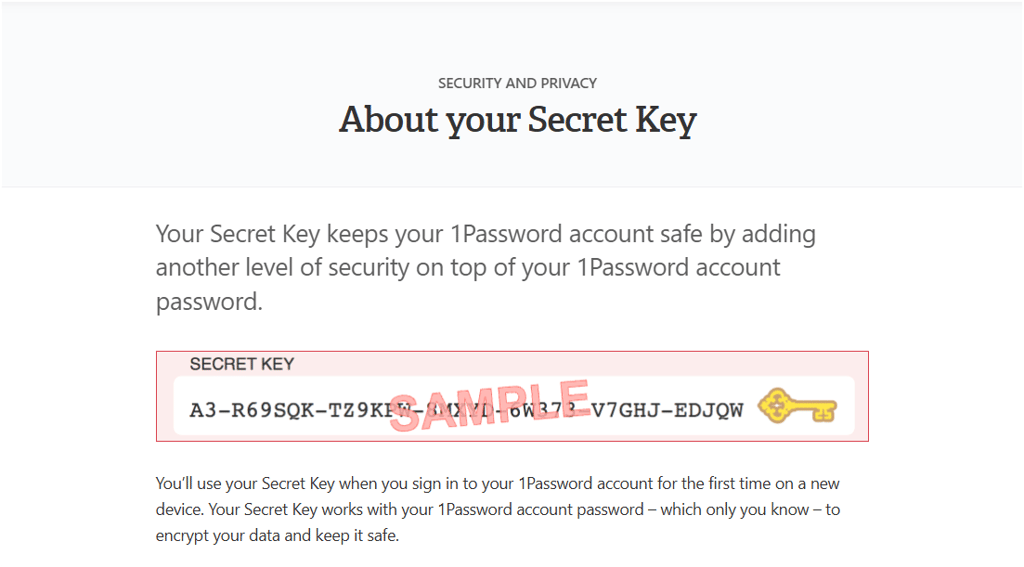
For even more protection, 1Password offers its Secret Key and Watchtower capabilities. The Secret Key is a 34-character key generated locally on each user’s device. It works alongside the account password to unlock your vaults, creating an extra layer of protection.
1Password Secret Key. Image: 1Password Support
Because the Secret Key is generated and stored locally, 1Password never has access to it. This ensures that your data cannot be collected, shared, or sold to third parties.
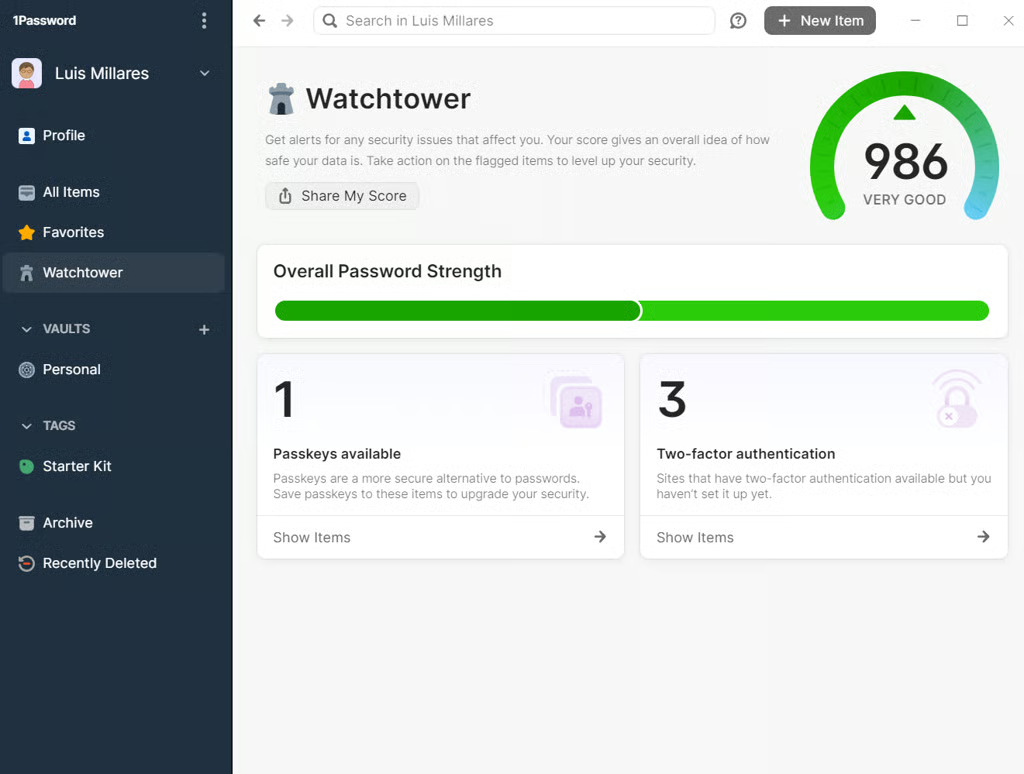
Watchtower, on the other hand, is 1Password’s security-scoring feature that evaluates user passwords. It evaluates the health of your passwords and, through its integration with Have I Been Pwned, checks whether any have been exposed in breaches or data leaks. It also looks at overall password strength and flags anything that’s weak, reused, or needs updating.
1Password’s Watchtower dashboard. Image: Luis Millares
Watchtower goes a step further by scanning recently visited websites for major vulnerabilities. If you land on a compromised or malicious site, it sends an alert to help you avoid potential risks.
For MSPs and their clients, Watchtower is helpful because it helps maintain password hygiene across the multiple accounts and credentials they manage.
Advertisement
Bitwarden’s open source transparency, audits, and Bitwarden Send
One of Bitwarden’s biggest draws as a password manager is its open-source nature. As open source software, its source code is publicly available for users and organizations to review and audit for vulnerabilities.
For many businesses, this level of transparency can be a deciding factor especially since critical data such as passwords and login credentials are at stake.
Bitwarden also publishes an extensive list of third-party security audits, easily accessible on its help portal. These include regular assessments of its web app, mobile apps, marketing site, and other parts of the platform — with reports dating back to 2018.
Bitwarden’s list of third-party audits. Image: Bitwarden Help Page
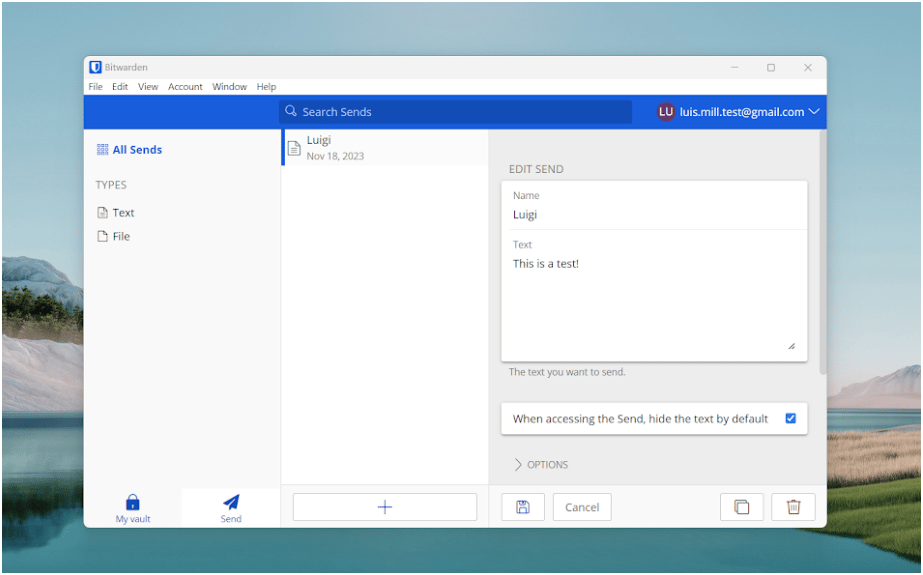
It also includes the Bitwarden Send feature, which allows users to send encrypted files (up to 500 MB) and text (up to 1000 encrypted characters) via secure file sharing.
Each Send is assigned a randomly generated, secure link that can be shared with anyone (including those without Bitwarden accounts).
Bitwarden Send encrypted text and file-sharing. Image: Luis Millares
Interestingly, Bitwarden Send has a configurable lifespan. Users can set how long a text or file can be accessed or viewed before being deleted from the system — a plus for privacy enthusiasts.
Advertisement
How both tools support MSP needs
1Password has an extensive MSP Resource Center designed to help service providers deploy and manage their clients’ password security. The hub includes implementation guides, training videos, and enablement content built to help technicians onboard customers efficiently.
MSPs also have access to detailed technical documentation covering everything from account setup to billing and ongoing client management.
Meanwhile, Bitwarden offers MSPs a dedicated account manager to help with deployment. Ongoing support and training are also included in its priority enterprise services.
Like 1Password, Bitwarden provides a robust resource center with a live MSP demo environment, a learning center with video training courses, and client enablement materials to help organizations hit their security goals.
Advertisement
Channel Insiders: partner feedback on 1Password and Bitwarden
To get a better sense of how 1Password and Bitwarden perform in real-world MSP environments, I reviewed discussions across third-party forums to understand current sentiment around their features, usability, and overall value as password management tools for service providers.
Ease of use as a priority
In the MSP Reddit community, one user asked specifically which of the two password managers was better. One user shared they preferred 1Password, saying:
“I am switching from Bitwarden to 1Password both internally and for my customers. 1Password is just much easier to use and more intuitive for the customer and it just works. The browser extension, website, and desktop app are all always in sync with each other and it ties in to Windows Hello much cleaner.”
“It is slightly more expensive, but I have felt it is worth it for how much fewer issues there have been. 1Password’s MSP program is somewhat new and only launched late last year, but it is all month to month with no minimum commitments and includes free licenses for the MSP to use internally.”
Advertisement
Support and easy deployment
Another post from the MSP Reddit community asked whether Keeper or Bitwarden’s enterprise offering was the better fit for MSPs. One commenter chose Bitwarden and explained:
“BW [Bitwarden] is great. Easy deployment SCIM and SSO work great if set up right. No issues with support so far. Great to have NFR licenses and they support data in Europe. End user deployment is very easy, adaption for the user is also easy.”
“Documentation for us was great, just csv import. They also have other but did not need to use it yet. Ask me questions if you have some”
Mixed app performance
Finally, one user in the MSP Reddit community described their experience moving from Bitwarden’s consumer version to an MSP environment. They noted that they didn’t have the best experience with Bitwarden’s app performance or overall smoothness.
“When I tried Bitwarden for my personal use, I found the interface was not nearly as good as 1Passwords. Also, not that it really matters but the Linux version was really slow for some reason.”
“Recently, I worked for an MSP that was using Bitwarden, and it was miserable. It took seconds to open/collapse folders. I don’t know if this was because of the sheer number of passwords stored in it, or if it’s just a slow app these days, but that’s just my experience. Never had a problem with 1Password.”
Advertisement
Bottom line: Which password manager is right for your clients in 2026
For MSPs, keeping account credentials secure is a critical part of maintaining a strong security posture. With this, password managers play a key role in protecting client credentials, streamlining access management, and reducing the risk of data breaches.
Between the two providers discussed, I recommend 1Password. While both 1Password and Bitwarden offer solid feature sets, 1Password’s well-rounded approach gives it a slight edge.
Partner feedback highlighted its smoother, more intuitive user experience—an important factor, since password security is only as strong as the usability behind it. On top of that, its robust security features, including Secret Key, Watchtower, and zero-knowledge encryption, make it a strong option for MSPs as a password management tool.
That said, Bitwarden remains a quality choice for organizations that prioritize transparency and open-source software. It also stands out for its affordability.
Advertisement
Methodology
This comparison draws from vendor documentation and real third-party user feedback to evaluate how 1Password and Bitwarden stack up for MSPs.
It was built using official product materials, partner program resources, and insights from MSP professionals across community forums and discussion groups.
This research-based approach highlights both what the vendors offer and what users actually experience in day-to-day operations.
Frequently asked questions (FAQs)
Yes, Bitwarden offers a “Provider Portal” that lets MSPs create and manage multiple client organizations from a centralized dashboard. With the portal, admins can manage seats, user groups, policies, and vaults for each client.
1Password also supports multi-tenant client management through its MSP program, allowing providers to add, link, and manage multiple client accounts (or companies) via a dedicated MSP console.
Bitwarden (especially under its “Teams” or “Enterprise” tiers) offers a more budget-conscious package and includes self-hosting as an option. This appeals to MSPs needing flexible deployments and a cost-effective option.
1Password Business, on the other hand, tends to provide a more fully featured and polished enterprise experience.
It delivers a rich MSP console, centralized admin and billing controls, detailed reporting, and a broad set of enterprise-grade password and credential management features.
It can. Self-hosting gives MSPs and clients complete control over where data is stored and how the environment is secured, helping them meet regulatory or internal compliance requirements.
However, security ultimately depends on how well the self-hosted environment is maintained. Cloud hosting may remain the safer choice for organizations without mature operations, necessary personnel, or infrastructure practices.
Luis Millares has extensive experience reviewing virtual private networks (VPNs), password managers, and other security software. He has tested and reviewed numerous forms of tech, covering consumer technology like smartphones and laptops, all the way to enterprise software and cybersecurity products. He has authored over 450 online articles on technology and has worked for the leading tech journalism site in the Philippines, YugaTech.com. He currently contributes to the Daily Tech Insider newsletter, providing well-researched insights and coverage of the latest in technology.
Flashpoint report finds agentic AI driving a 1,500% surge in cybercrime activity as attackers automate phishing, credential abuse, and ransomware attacks.
Channel Insider combines news and technology recommendations to keep channel partners, value-added resellers, IT solution providers, MSPs, and SaaS providers informed on the changing IT landscape. These resources provide product comparisons, in-depth analysis of vendors, and interviews with subject matter experts to provide vendors with critical information for their operations.
Advertiser Disclosure: Some of the products that appear on
this site are from companies from which TechnologyAdvice
receives compensation. This compensation may impact how and
where products appear on this site including, for example,
the order in which they appear. TechnologyAdvice does not
include all companies or all types of products available in
the marketplace.