Channel Insider sought nominations from IT vendors, solution providers, and partners to highlight impactful collaborations. Check out our top choices here.
Video: Harbor IT on NENS Acquisition and Why the Generalist MSP Model Is Dying
Leaders from Harbor IT explain why the traditional generalist MSP model is fading and how specialization, cybersecurity expertise, and vertical industry focus are shaping the future of managed services.
Video: Hype, Bubble, or Breakthrough? Talking All Things AI with The Neuron
In this Channel Insider crossover, the hosts of The Neuron break down the AI race, the bubble debate, and what today’s tools really mean for businesses and everyday users.
Video: SurePath AI CEO Secure GenAI Adoption with Zero Trust
SurePath AI CEO Casey Bleeker explains how organizations can accelerate generative AI adoption using zero trust principles and AWS guardrails without increasing security and compliance risk.
Industry experts from Netskope and Optiv explain how their partnership helps organizations secure cloud and AI adoption while balancing innovation governance and real world security outcomes.
Channel Insider sought nominations from IT vendors, solution providers, and partners to highlight impactful collaborations. Check out our top choices here.
Video: Harbor IT on NENS Acquisition and Why the Generalist MSP Model Is Dying
Leaders from Harbor IT explain why the traditional generalist MSP model is fading and how specialization, cybersecurity expertise, and vertical industry focus are shaping the future of managed services.
Video: Hype, Bubble, or Breakthrough? Talking All Things AI with The Neuron
In this Channel Insider crossover, the hosts of The Neuron break down the AI race, the bubble debate, and what today’s tools really mean for businesses and everyday users.
Video: SurePath AI CEO Secure GenAI Adoption with Zero Trust
SurePath AI CEO Casey Bleeker explains how organizations can accelerate generative AI adoption using zero trust principles and AWS guardrails without increasing security and compliance risk.
Industry experts from Netskope and Optiv explain how their partnership helps organizations secure cloud and AI adoption while balancing innovation governance and real world security outcomes.
Channel Insider content and product recommendations are
editorially independent. We may make money when you click on links
to our partners.
Learn More
Remote monitoring and management (RMM) solutions are one of the most effective ways for MSPs and IT teams to manage IT environments remotely. With the rise of hybrid and global workforces, RMM software helps organizations maintain visibility, minimize downtime, and keep end-user devices operating smoothly.
Atera and NinjaOne are two of the leading RMM providers in this space. Both offer broad feature sets and distinct value propositions, making it challenging to choose between them.
This guide compares the two platforms to help you determine which solution is the better fit for your organization. Ultimately, I recommend the NinjaOne RMM solution as my top choice due to its ease of use and consistency.
Atera and NinjaOne both have a strong track record of delivering innovative, high-value solutions for MSPs and IT teams.
Recent updates this year, such as Atera’s launching IT Autopilot for automated ticketing and self-service or NinjaOne rolling out an integration with Microsoft Intune for unified endpoint management, show how each vendor continues to push its platform forward.
Whichever you choose, both providers remain closely matched in their pace of development and feature innovation.
Atera
NinjaOne
Real-time monitoring
Yes
Yes
Patch management
Yes
Yes
Customizable alerts
Yes
Yes
Remote Access
Yes (via Splashtop, TeamViewer, AnyDesk)
Yes (via NinjaOne Remote)
Notable integrations
Zapier, Microsoft Teams, ESET, Miradore, ScalePad, Google Calendar, IT-Glue, Duo Security
ServiceNow, CrowdStrike, SentinelOne, Microsoft Entra, Okta, PagerDuty
Atera offers four subscription tiers: Professional, Expert, Master, and Enterprise. Fortunately, Atera offers a 30-day free trial of its entire platform, including its RMM solution, with no credit card information required.
Below is a quick overview of each tier’s pricing and feature inclusions:
Professional
Expert
Master
Enterprise
Price
$149/month/per technician
(billed annually)
$189/month/per technician
(billed annually)
$219/month/per technician
(billed annually)
Contact Atera for a custom quote
Featuresincluded
Remote monitoring and alerts, remote management, Splashtop, patch management, software management, Azure AD integration, and audit log (1 month retention)
All Professional features plus Splashtop concurrent sessions (unlimited), remote access using AnyDesk, 11 preset reports, and ticket auto tagging
All Expert features, plus custom analytics reports (up to 10), custom asset types (up to 20), audit log (12 months retention), and custom support addresses (unlimited)
All Master features plus SSO, Azure AD continuous sync, private software repository, and custom domain SSL for service portal
Advertisement
NinjaOne Pricing
Meanwhile, NinjaOne unfortunately doesn’t publicly publish the pricing information of its RMM solution. For pricing, contact their sales team to request a custom price quote.
Plan
NinjaOne RMM
Price
Contact sales for a quote
Free trial
14 days (includes full NinjaOne RMM)
In place of transparent pricing, NinjaOne offers a free trial with a reasonable 14-day period and a live demo of its RMM service. I also appreciate that no credit card info is required to leverage the free trial.
Atera vs NinjaOne: Key Features
Remote monitoring and alerts
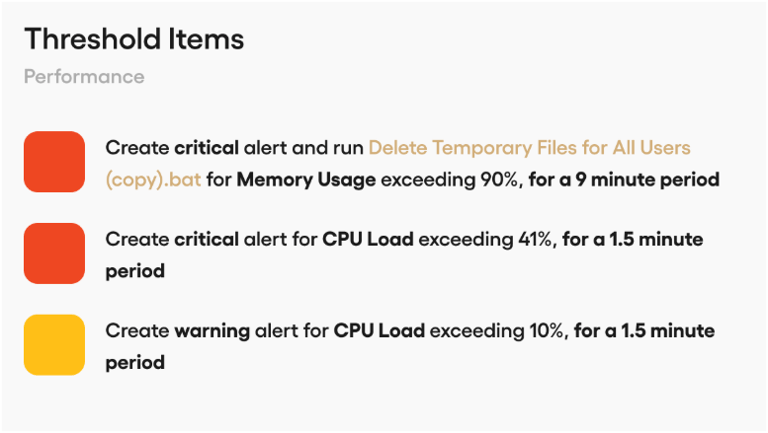
Atera provides real-time monitoring and alert capabilities. Users can receive alerts across a wide range of signals, including system resources, logged-in users, network and IP monitoring, Active Directory events, and more.
Threshold Items on Atera. Image: Atera
Atera’s alerts are also highly customizable. Admins can define alert thresholds for categories such as memory usage, CPU load, or device temperature, and build highly granular “threshold profiles.” These profiles allow teams to fine-tune parameters and other variables so they are notified only about end-user devices when necessary, as specified.
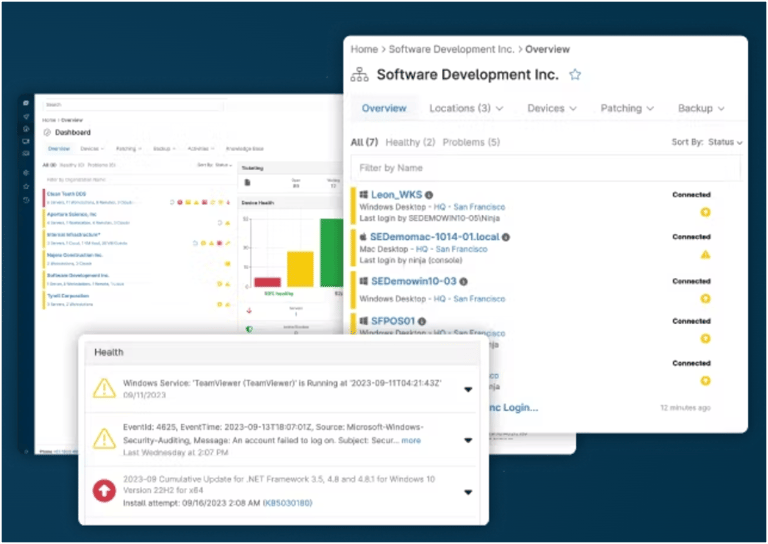
On the other hand, NinjaOne offers similar real-time monitoring and automated alerting for its users, delivering unified visibility of all endpoints from a single platform. This gives IT teams a bird’s-eye view of the entire infrastructure, enabling them to gain insights and access device data remotely.
Custom alerts with NinjaOne. Image: NinjaOne
For alerting, NinjaOne lets admins create custom notifications based on system performance and health metrics to help teams respond faster and reduce overall ticket volume. The platform includes more than 100 monitoring templates for proactive issue detection.
Advertisement
Patch management
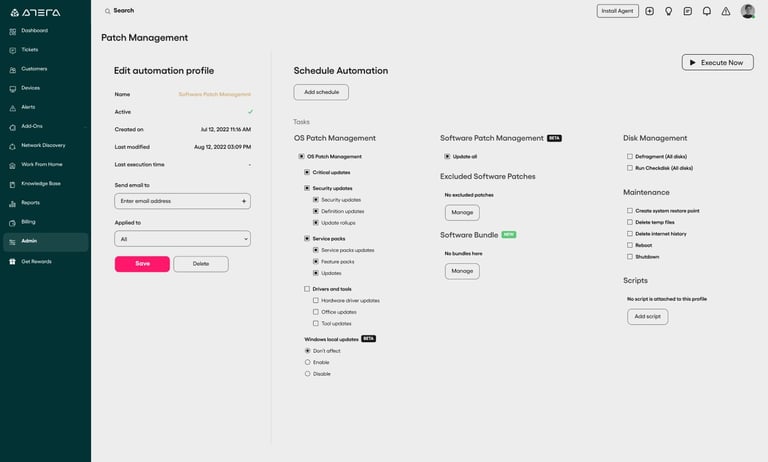
For patch management, Atera’s solution is comparably strong, with customizable automated scheduling, detailed compliance reporting tools, and proactive automated maintenance to keep endpoints healthy and secure. It also provides real-time visibility into patch statuses, including alerts for missed patches or other unexpected issues.
On the AI front, Atera integrates with Microsoft AI Copilot to deliver real-time device diagnostics, generate AI-driven audit logs, and proactively analyze patch-related alerts.
Atera’s patch management interface. Image: Atera
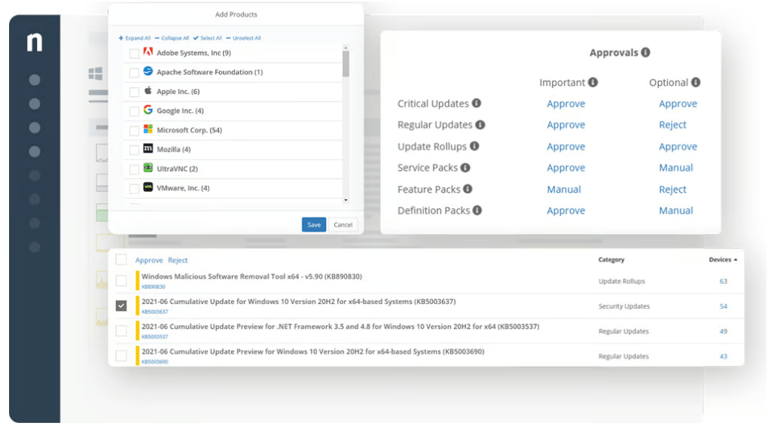
Meanwhile, NinjaOne delivers automated, multi-platform patching that can deploy updates across Windows, macOS, Linux, and over 6,000 applications. Its AI-powered system helps prioritize which patches to deploy first, reducing risk and preventing unnecessary disruptions to your organization’s operations.
Patch management process in NinjaOne RMM. Image: NinjaOne
NinjaOne’s patch management tool also uses intelligent automation and policies to ensure updates are delivered on time and that each endpoint remains secure and compliant.
Advertisement
Remote access and control
One of the core capabilities of any RMM solution is remote access.
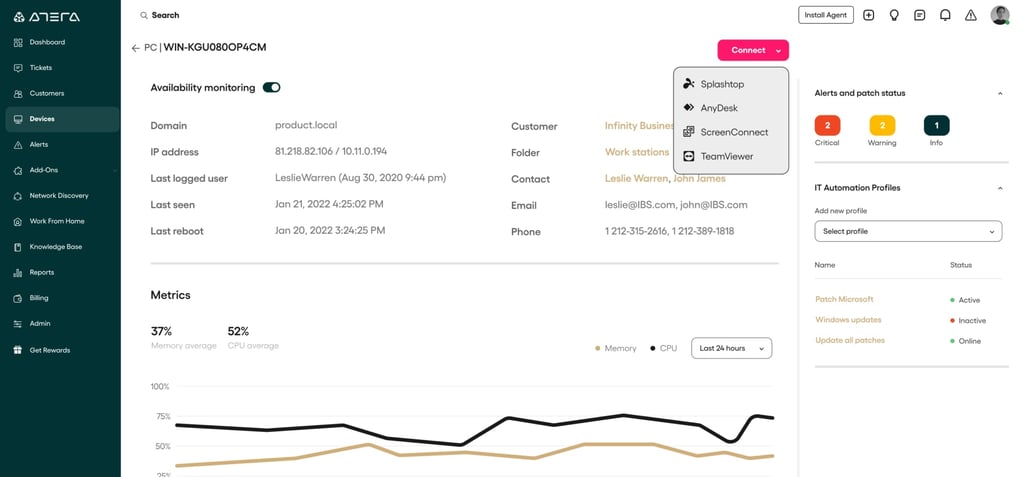
With Atera, admins can quickly access computers, servers, applications, and files with a single click. It supports both attended and unattended sessions, allowing IT professionals and technicians to take control from anywhere.
Devices menu on Atera. Image: Atera
Remote sessions can also be launched directly from an alert, a ticket, or a device view using AnyDesk or Splashtop. Employees can also use Atera through Splashtop Remote Access to work securely from home, available as an additional subscription.
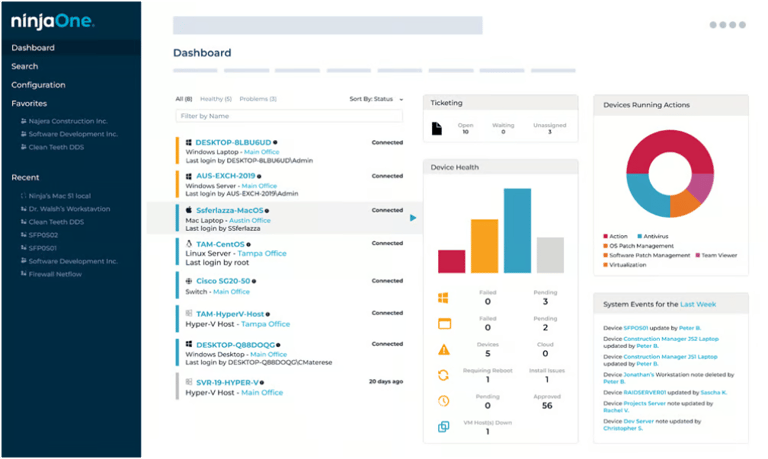
On the flipside, NinjaOne provides comparable single-click remote access, enabling reliable connections to any Mac or Windows device from the NinjaOne console. This helps technicians work efficiently without unnecessary delays.
NinjaOne’s dashboard with connected devices. Image: NinjaOne
NinjaOne also includes advanced support capabilities, such as multi-screen support and live chat, with differentiated cursors to keep collaboration clear during remote sessions. The platform also emphasizes state-of-the-art encryption, ensuring that each remote session remains secure and private.
Advertisement
Atera vs NinjaOne: Integrations and ecosystem depth
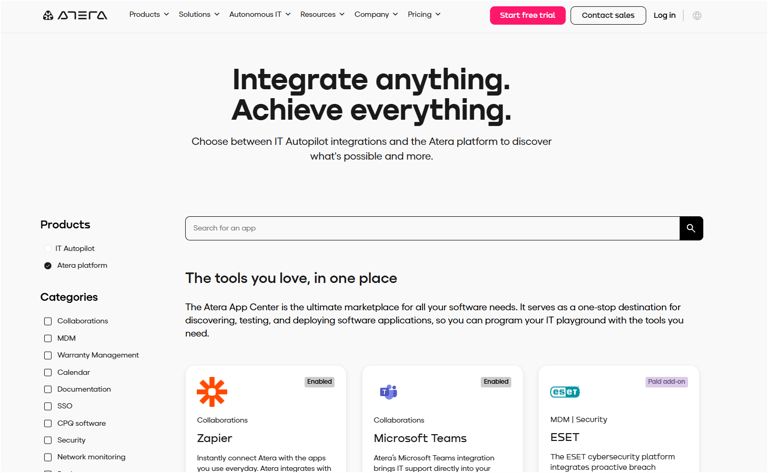
Both solutions offer a strong range of integrations. Atera supports key services across security, collaboration, SSO, documentation, and more, including Zapier, ESET, Duo Security, and Google Calendar, among others.
Atera’s integration portal. Image: Atera
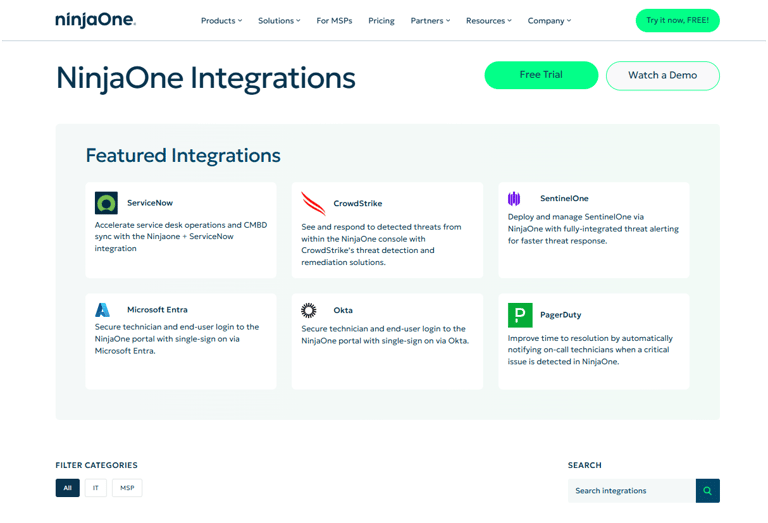
NinjaOne’s integrations also hold their own, with featured partners such as ServiceNow, CrowdStrike, SentinelOne, Microsoft Entra, Okta, and PagerDuty. Their catalog is thoughtfully organized for both IT teams and MSP customers.
NinjaOne’s integrations page. Image: NinjaOne
Both vendors deserve credit for providing clear, structured integration pages with filters that help buyers quickly confirm whether the services they require are supported.
Channel Insiders: partner feedback on Atera and NinjaOne
To better understand how Atera and NinjaOne perform in the real world for MSPs, I reviewed discussions across third-party forums to gauge current sentiment on each solution’s features, usability, and overall value as RMM platforms for service providers.
NinjaOne: positive experience as a whole
In the MSP Reddit community, one user started a thread asking opinions on the best RMM solution available today. One user chose NinjaOne, saying:
“We are very happy with NinjaOne. The UI is good, intuitive and user friendly. The OS patching is good, and scripting possiblities endless. They have a built in remote support application (Ninja Remote) but also offer Splashtop for example. Backup is integrated, although third party. I don’t personally use it, but have tried some demo’s and it works great (although the demo’s are already a year ago, so don’t have up to date information about that),” they said.
“Support is the best and friendliest I have ever seen. Really can’t say much bad about them,” they added.
Advertisement
Atera: affordable but a mixed bag
In another post on the MSP Reddit community, a user asked for the general consensus on Atera as a provider. One commenter shared mixed thoughts, highlighting some positives and negatives:
“It’s relatively inexpensive, their pricing model is per agent. It handles pretty much everything you need, just not always intuitively. For the platform, I’d give it a 8/10 rating. For their mobile app I’d give it a 2/10 rating.”
The comparison: price versus performance
Lastly, one user in the System Administrators Reddit community asked directly which provider was the better option. One commenter who has used both said:
“I have and use both and I think Ninja is the better product but it’ll be more expensive if you have a lot of endpoints vs a lot of techs.”
Advertisement
Bottom line: Which RMM is right for you in 2026
For MSPs, choosing the right RMM platform is a critical part of maintaining a reliable and secure IT environment.
Between the two RMM providers in this comparison, I recommend NinjaOne RMM. While both Atera and NinjaOne deliver high-quality remote monitoring and management capabilities, NinjaOne stands out for its ease of use, consistency, and overall performance.
Across my research, NinjaOne was frequently cited as a top RMM choice thanks to its intuitive interface and long-term viability. Its well-rounded platform—covering remote access and control, patch management, alert customization, and automation—paired with exceptional reliability makes it the stronger option between the two.
That said, Atera remains a solid RMM solution, particularly for MSPs that value transparent, predictable pricing and want a cost-effective platform without sacrificing core RMM capabilities.
Advertisement
Methodology:
This article compares Atera and NinjaOn based on vendor documentation and real third-party user feedback to evaluate how they compare as RMM solutions.
It was built using official product materials, partner program resources, and insights from MSP professionals across community forums and discussion groups.
This research-based approach highlights both what the vendors offer and what users actually experience in real, day-to-day operations.
Frequently asked questions (FAQs)
Which RMM integrates best with Microsoft 365?
NinjaOne arguably has stronger alignment with the Microsoft ecosystem through its integration with Microsoft Intune/Entra ID, making it a better option for organizations heavily invested in Microsoft 365.
Atera also supports Azure AD, but NinjaOne’s endpoint management tie-ins are deeper.
Advertisement
What is the best RMM for MSPs in 2026?
Although needs can vary by organization, we consider NinjaOne a top choice for RMM in 2026 based on usability, performance, and strong partner feedback. However, Atera remains a great choice for MSPs who want transparent, per-technician pricing.
The best fit ultimately depends on whether you prioritize cost efficiency (Atera) or platform depth and reliability (NinjaOne).
Can AI actually improve ticket resolution times?
Yes, AI can automate diagnostics, categorize tickets, suggest fixes, and even remediate common issues, significantly reducing technician workload and accelerating ticket resolution.
Both Atera (via Microsoft Copilot) and NinjaOne (Patch Intelligence AI) already use AI to streamline operations.
Luis Millares has extensive experience reviewing virtual private networks (VPNs), password managers, and other security software. He has tested and reviewed numerous forms of tech, covering consumer technology like smartphones and laptops, all the way to enterprise software and cybersecurity products. He has authored over 450 online articles on technology and has worked for the leading tech journalism site in the Philippines, YugaTech.com. He currently contributes to the Daily Tech Insider newsletter, providing well-researched insights and coverage of the latest in technology.
Salesforce launches Agentforce Contact Center, unifying AI agents, voice, digital channels, and CRM to deliver seamless service and smarter customer support.
Channel Insider combines news and technology recommendations to keep channel partners, value-added resellers, IT solution providers, MSPs, and SaaS providers informed on the changing IT landscape. These resources provide product comparisons, in-depth analysis of vendors, and interviews with subject matter experts to provide vendors with critical information for their operations.
Advertiser Disclosure: Some of the products that appear on
this site are from companies from which TechnologyAdvice
receives compensation. This compensation may impact how and
where products appear on this site including, for example,
the order in which they appear. TechnologyAdvice does not
include all companies or all types of products available in
the marketplace.