




Adder Proves KVM Still Has Relevance - A Closer look at the AVX1016IP (
Page 2 of 2 )
The AVX1016IP is a high-density,
small-form factor, 16-port KVM switch that provides local, remote and over-the-Web
access for users who need to control multiplatform operating systems and
hardware. The unit combines USB console
support, global IP access and a full KVM feature set. It offers high-quality
video and CD-quality audio. The unit’s flexibility makes it suitable for server
installations or industrial processes or for office control.
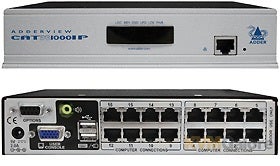
The AVX1016IP is an unobtrusive box that features
an Ethernet port and status LEDs on the front and 16 RJ-45 jacks on the back
for system connections. Keyboard, mouse and video ports are on the back of the
unit, along with an audio port. Support for stereo audio is somewhat unique in
a KVM switch. The ability to hear audio from the system being managed is
becoming more important as businesses deploy PC-based PBXes, along with
software-based VOIP solutions.
The AVX1016IP helps to reduce the tangle
of cables commonly associated with KVM switches by using a modular approach.
Each connected system uses a CAM
(connection access module), which features keyboard, mouse, audio and video
connections and is connected via a standard CAT-5
cable back to the unit. The single-cable approach is a vast improvement over
the proprietary extension cables found with most KVMs. CAMs can be
located as far as 100 meters from the KVM. Adder offers CAMs for PS2, USB
and SUN systems, with audio support optional
on each module.
The general layout of the unit and the incorporation of CAMs make deployment
incredibly easy. Just provide power to the unit and plug in the appropriate
CAMs and cables, along with a local mouse, keyboard and monitor (speakers
optional), and the system is ready for use. For remote access, a TCP/IP
connection needs to be set up for the unit, which proves to be a simple task of
plugging in an RJ-45 Ethernet cable to the front of the unit and programming
the unit for either DHCP or static IP addressing.
Video and audio quality is quite impressive, especially for a KVM. The unit
supports resolutions as high as 1,600 by
1,200 and audio quality of 44.1kHz. Interestingly, the unit has no buttons or
physical controls on the front; users will rely on keyboard commands (when
local), such as a CTRL-ALT combo, to access
the unit’s management menus or switch between systems.
Administrators will log in to the unit to manage the features, which range
from integrated security to system naming to connectivity options. Security is
handled by the common user name and password combo and proves to be very
granular, allowing certain users to access only certain systems. The KVM switch
supports various levels of encryption for both signal transmission and user
account information.
Perhaps the most important feature of the unit is remote connectivity. Here,
Adder has paired support for RealVNC with TCP/IP
connectivity. That allows a user to remotely attach to the unit over an IP
connection and have complete control over the connected systems. Remote users
can accomplish that by using a Java-based client offered directly from the
unit’s integrated Web server or use a locally installed copy of VNC.
Adder makes it quite easy to get VNC going, simply because it offers a link
to download the software directly from the unit’s browser-based management
console. Solution providers will be surprised with the quality of RealVNC
support; video is very smooth, while control is very responsive. A VNC session
can be hard to distinguish from an actual physical session—the integration and
support is that good.
Solution providers will appreciate the level of control offered by Adder’s
KVM switch. In our tests, we were able to program the BIOS of our test servers
to power up the server by using the space bar on the keyboard. That allowed us
to remotely access the server and perform a complete shutdown (for patching
purposes) and then reconnect the keyboard to the server via a remote KVM
session and simply press the space bar to initiate a power up.
That is just one of the scenarios where the AVX1016IP
proves to be superior to software remote control solutions. We were also able
to reboot our remote systems and then hit the appropriate key combination to
launch BIOS setup. That capability allows administrators to remotely change
BIOS settings or even reflash a BIOS with new firmware.
With the AVX1016IP, Adder proves there is
still life in the KVM market. The company offers an aggressive channel program
that features decent margins and technical support. Those interested in
partnering with the company will find that there are no real hurdles and can be
assured that the company’s products won’t be showing up on retail shelves any
time soon. The product’s simplicity, along with its impressive feature set,
makes the unit a good choice over many of the competitors on the market (most
of which don’t offer IP remote support), as well as a good choice over many of
the available hosted- or subscription-based remote control options.