











Typed DataSets are a common feature in .NET development projects. With the release this year of Visual Studio 2005 and the .NET Framework 2.0, how will your Typed DataSet projects fare in the upgrade process?
In this article, I discuss how the 2.0 Typed DataSets differ from the 1.x ones, and how upgrading your projects will affect your use of Typed DataSets.
While the mechanics of creating Typed DataSets are very much the same as in earlier versions of Visual Studio, the new Typed DataSets try to do much more for you.
Typed DataSets continue to work in a similar fashion to earlier incarnations, in that the designer is creates an XML Schema Document (XSD) and does code generation based on that xsd. In addition to creating the DataSet, DataTable, and DataRow derived classes, the new Typed DataSet adds a new object that is generated, called a TableAdapter. The TableAdapter’s role is to be the data access point for a single table.
There are several differences between the old version and the new. Among them are:
- Relationships are automatically gathered from the Server Explorer.
- A new data access object, called a TableAdapter, is created based on each of the tables.
- You cannot view the Typed DataSet’s XSD unless you open it explicitly in the XSD or XML viewer.
Before we get too far into theory, let’s take a look at the process of adding a Typed DataSet to your application.
A Walkthrough of 2.0 Typed DataSets
To add a Typed DataSet to your project, pick “Add New Item” from the menu, as seen in Figure 1:
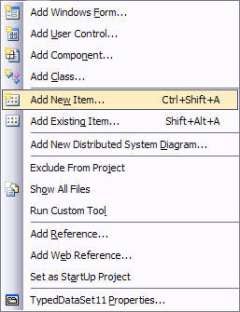
Figure 1: Add New Item
Then, pick “DataSet” from the Add New Dialog, as in Figure 2:
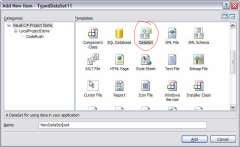
Figure 2: Adding a DataSet
Adding a new DataSet to your project gives you a new Typed DataSet design surface. To add tables to your project, you select tables, views, or stored procedures from the server explorer (as you see in Figure 3):
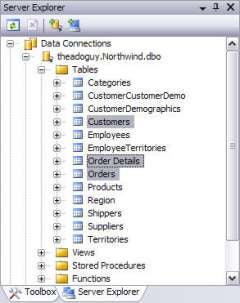
Figure 3: Picking Tables, Views or Stored Procs
Dragging and dropping the tables onto the design surface yields three tables, with relationships and TableAdapters, as seen in Figure 4:
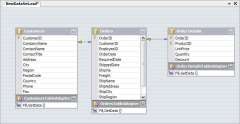
Figure 4: New Typed DataSet in the Designer
Straightforward enough, right? Now let’s examine each of those features in more detail.
TableAdapters
The purpose of TableAdapters is to simplify development. In .NET Framework 1.1, developers were often confused about how DataAdapters and DataSets worked together. By adding TableAdapters to the generated code of Typed DataSet, Microsoft hopes to end some of this confusion.
TableAdapters are constructed much like DataAdapters (see Figure 5), but they are type-safe. Interestingly, Microsoft decided that TableAdapters should not derive from DataAdapters by default. They contain a DataAdapter that does most of the work, but the DataAdapter itself is not exposed. When the TableAdapter is created, it (by default) creates GetData, Fill, and Update methods. The GetData method builds a DataTable and returns that DataTable. In contrast, the Fill method fills an existing DataTable (usually contained in a DataSet). The Update method (like DataAdapters) updates a DataRow or entire DataTable.
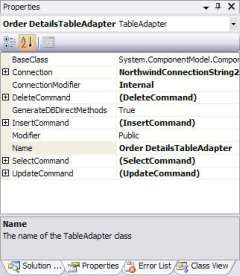
Figure 5: TableAdapter Properties
Within the TableAdapter is a “Query” object that you use to create the GetData and Fill methods. You can change these to specify which (or both) to create and rename the methods, as seen in Figure 6:
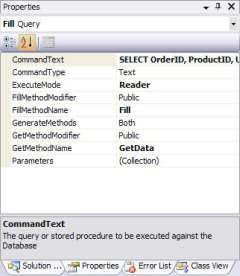
Figure 6: TableAdapter Query Properties
However, the problem with TableAdapters is the same as with DataAdapters. Updating a complex DataSet remains problematic, because there’s no support for smart updating based on relationships. With related data, Inserts and Updates must be performed top-down, while Deletes must be handled bottom up. TableAdapters have no support to do this, so you are left to handle this on your own. (On my own site, I offer an option of how to handle this with DataAdapters.)
Upgrading Your Typed DataSets
When you upgrade a Visual Studio .NET 2002/2003 project to Visual Studio 2005, your Typed DataSets will migrate seamlessly, for the most part. You should get the same functionality as you had previously. The nature of 1.x Typed DataSets are completely handled in Visual Studio 2005.
Upgrading the project may only be part of the change, though. To make your Typed DataSets behave more like 2.0 Typed DataSets takes a little more work.
TableAdapters
Currently, there is no way to add TableAdapters for migrated DataTables. If you want the TableAdapter style of data access, you have to re-create your Typed DataSets. That’s because, when you drag and drop a table onto the Visual Studio 2005 designer, it stores information about the connection and SQL string used to create the TableAdapter and DataTable. Without redoing the work entirely, there is no way to generate that code.
Because this information is missing, when you try to add the TableAdapter to the DataTable, the option is unavailable, as seen in Figure 7:
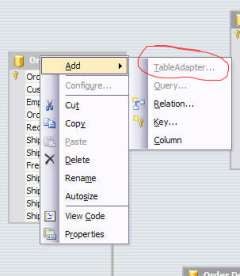
Figure 7: TableAdapters are not available for Upgraded Typed DataSets
If you plan to continue to use DataAdapters, this should not be much of a hindrance. TableAdapters are more for clarity and simplification than for new functionality. TableAdapters have nearly the same feature set as DataAdapters (in fact, they are implemented using a DataAdapter), so converting to TableAdapters is definitely not required.
Customizing DataSets
Another place where Visual Studio 2005 Typed DataSet varies from Visual Studio .NET 2002/2003 is in how Typed DataSet annotations work. Annotations are used to specify specific naming and behavior changes in Typed DataSets. Using annotations was primary done by hand-editing the .xsd to include the codegen namespace. With this namespace, you could rename the plural and singular form of DataTable properties, change the way data was defaulted, and rename the accessors for getting related DataRows.
When you upgrade a project to Visual Studio 2005, these older annotations are completely supported, and your .xsd is not changed at all. (Whew.) If you make any changes to the Typed DataSet, the old annotations are replaced with new style annotations.
Yet, even though the behavior is identical, it is important to understand how these new annotations work. This is because the designer still does not support changing these code generation options directly. To get at the annotations, you need to view the Typed DataSet in an XML view. Unfortunately, they have removed the convenient XML tab from the Typed DataSet designer. You can still view it as XML, by right clicking the Typed DataSet and picking “Open With,” as seen in Figure 8:
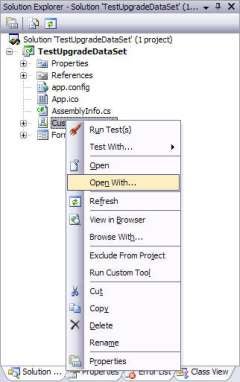
Figure 8: Open With…
Once you select to “Open With” the Typed DataSet, you get a dialog box in which you can specify which editor to use. Choose the XML Editor, not the XSD editor, as seen in Figure 9:
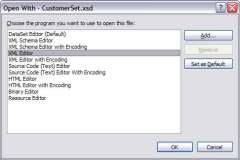
Figure 9: Open With Dialog
Once you have the .xsd open in the XML editor, you will notice the new style of annotations: they all start with msprop:Generator_. There are two ways to think about the new annotations: “It is good that they include all the annotations, so I can change them without too much trouble,” or, “If I don’t use the annotations, they just muddy up my schema document.”
Upgrading your Typed DataSets does not have to be a harrowing experience. Luckily, Microsoft has taken the tack that it should be as compatible as possible. But they have not gone quite far enough, in my opinion. Hopefully, this article will help to streamline your move from Visual Studio .NET to Visual Studio 2005.
Here is a list of the annotations and what they are for. They don’t seem to be documented, so be wary of the possibility of changes in the future. In upgraded Typed DataSets, these should be used instead of the older style annotations.
| Annotation (all start with ‘msprop:’) | Valid On | Description |
|---|---|---|
| Generator_UserDSName | DataSet | Unknown (no effect detected) |
| Generator_DataSetName | DataSet | Name of the DataSet class. |
| Generator_UserTableName | DataTable | Name of the Table accessor on DataSet |
| typedName | DataTable | Name of accessors that take the singular form. (Older form, use Generator_TableClassName instead.) |
| Generator_RowClassName | DataTable | Name of the DataRow class for that table |
| typedPlural | DataTable | Name of accessors that use the plural form |
| Generator_TableClassName | DataTable | Name of accessors that take the singular form |
| Generator_TableVarName | DataTable | Name of the variable for a table in the DataSet class |
| Generator_TablePropName | DataTable | Name of the DataSet property for that table (overrides Plural form) |
| Generator_RowEvArgName | DataTable | Name of the RowChanged Event Argument Class |
| Generator_RowEvHandlerName | DataTable | Name of the RowChanged Event Handler class |
| Generator_UserColumnName | DataColumn | Unknown (no effect detected) |
| Generator_ColumnVarNameInTable | DataColumn | Name of the local variable in the Table |
| Generator_ColumnPropNameInRow | DataColumn | Name of the property on the Row |
| Generator_ColumnPropNameInTable | DataColumn | Name of the Column property on the Table |
| nullValue | DataColumn | Specifies what is returned if the column is null. Literal value or _null or _empty are valid. |
| rel_typedChildren | DataRelation | The name of the Method to get children of a Row. (Older form, use rel_Generator_ChildPropName instead.) |
| rel_typedParent | DataRelation | The name of the property to get the parent of the Row. (Older form, use rel_Generator_ParentPropName instead.) |
| rel_Generator_ChildPropName | DataRelation | The name of the Method to get children of a Row |
| rel_Generator_ParentPropName | DataRelation | The name of the property to get the parent of the Row. |