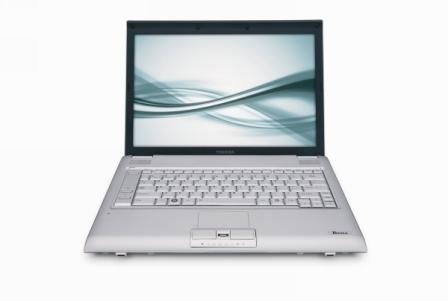





Toshiba`s Latest Tecra Turns Compromise into an Art Form - Presenting the Tecra R10 (
Page 2 of 2 )
Out of the box, the Tecra R10 offers a plethora of features and capabilities, purchasers will find that the unit features an Intel Centrino 2 CPU, NVIDIA's 128MB Quadro NVS GPU, 14.1-inch LED-backlit display, ExpressCard slot, USB Sleep-and-Charge / eSATA combo port , 7200 RPM hard drive, DVD Super MultiDrive all packed into a slim 1.13 inch 4.4 pound package.
Toshiba sent Channel Insider a Tecra R10 S4401 for evaluation. That particular unit retails for $1,549 and comes with a few additional features not found on a base R10 system. For example, the S4401 offers 3Gbytes of DDR2 ram (just the right amount for 32 bit versions of Vista), a 160Gbyte hard disk drive and a SP9300 Core 2 Duo processor with Vpro technology.
One of the first things solution providers will notice about the R10 is that it is lighter than it looks, although the unit is slim, the case is a little on the large side, with a bezel around the screen and plenty of real estate around the keyboard. That makes the system look larger than it feels, perhaps adding to the assumption of value, but more importantly, making room for an integrated webcam and control buttons located conveniently next to the keyboard.
Performance wise, the R10 holds its own – the included battery offers near 5 hours of usable life with powersaving features enabled and about 3 hours when configured for maximum performance. The discrete graphics from Nvidia, 3Gbytes of RAM, SP9300 CPU and fast hard drive help to supercharge the unit’s performance to a level that was once only found onprevious generation desktop replacement systems. Vista scores the unit with a 4.4 on the Windows Experience Index, with the graphics rating coming at 4.4 and the rest of the elements scoring in the mid to high fives.
Testing the unit with PassMark’s Peformance Test v6.1 showed the unit could play well with other high performers in the market with a PassMark Rating of 773.9.
The overall construction of the unit showed excellent integration of the associated parts and extensive thought to ergonomics, a giant leap in the right direction when it comes to notebook design. Yet, there is significant room for improvement with the unit. For example, the display is limited to a resolution of 1280 by 800 pixels – a good resolution for perhaps a 12.1” screen, but that resolution does waste valuable real estate on a 14.1” display. An option for a higher resolution would be a nice touch here.
Also, the initial setup process of the system can be time consuming and tedious. On the first boot of the system, the user is presented with a screen where they can choose between installing a 32 bit version of Vista Business Edition or a 64 bit version of Vista Business Edition. With the intention of running advanced applications and adding more RAM, we chose to install the 64 bit version of Vista. The install and configuration of the operating system and bundled applications took more than an hour and a half. Quite time consuming, especially for a solution provider looking to deploy dozens of these systems at a client location.
In Toshiba’s defense, the install is for the most part automated, but someone does have to keep an eye on the system to answer the odd installation query or approve the various license agreements that pop up. Toshiba does try to limit the bloatware that is all too common on today’s system, but does bundle in a security package from Symantec, Skype and a trial version of Microsoft Office. For most business users, the first task will be to remove those additional applications and then install whatever company policy dictates. Perhaps Toshiba should consider including those applications on a separate CD to alleviate the chore of removing applications that for the most part will probably go unused by the typical business user.
With the Tecra series, Toshiba wants to emphasize the company’s commitment to quality. Toshiba accomplishes that by including a 3 year warranty, which demonstrates the company’s focus on quality. For solution providers, a 3 year warranty can be both a blessing and a curse. 3 years sounds great when selling a product, but it does prove to be a long time to maintain a product. Toshiba recognized that dilemma and has made it easy for end users to perform self service warranty returns and does offer solution providers extended and enhanced warranty packages to sell as add-ons to the product.
While the Tecra R10 may not be the perfect notebook for everyone, Toshiba does prove that you don’t have to be the slimmest, lightest, fastest and cheapest notebook on the block to be popular. Solution providers can find additional information on the Tecra series on Toshiba’s Web site and more specifics on the companies channel programs under Toshiba’s partner’s links.