











Take a look at the
typical desk and you will find stacks of paper. For some
people, it’s a fact of life. For others, it’s an exercise in
frustration.
Desk-bound workers
aren’t the only ones confounded by paper. The situation can be much
worse for mobile workers, who often don’t have the luxury of a
stationary desk and are forced to lug around documents, forms and
receipts.
While some think the
brunt of paper documents as a waste of time and money, solution
providers can look at those stacks of documents and see opportunity,
the opportunity to sell solutions and help customers organize the
minutiae. What’s more, those desktop solutions can lead to large scale
implementations that incorporate document management systems,
integration with Microsoft’s SharePoint, involve compliance
technologies, while prompting the growth of storage solutions. Simply
put, eliminating paper can lead solution providers to a different kind
of paper – money.
While large scale
implementations have their appeal, most solution providers, especially
those dealing with small businesses, will find it is best to start off
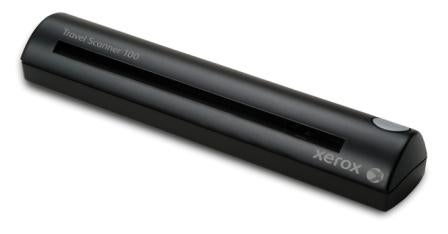
small and that is where Xerox enters the equation with the Travel
Scanner 100. The Travel Scanner weighs in at 10.6 ounces and comes
bundled with software from Visioneer, which offers one-touch scanning
and auto-document optimization using VRS technology from Kofax.
For the desktop, a
scanning solution needs to be easy to use and fast enough to be
worthwhile. Mobile workers need the same capabilities as desktop users,
but with a twist – not only does the scanner need to be easy to use and
speedy enough to make sense, it also has to be highly portable and very
compact. Here the Xerox Travel Scanner 100 fits the bill – the
unit weighs in at a svelte 300 grams, measures just 2" x 1.5" x 11.4",
making the device easy to shove in most any laptop bag. What’s more,
the unit is powered via the computers USB 2.0 part, so no additional
power supply is needed. Xerox includes a leatherette travel bag that
protects the unit from bumps while jostling around during travels.
The unit features
resolution as high as 600 dpi with 24-bit color and can scan as fast as
six pages per minute at 200 dpi, which should be adequate for most
documents. Scanning performance is further improved by the inclusion of
Visioneer’s one-touch scanning application, which can scan a document
directly to an image or PDF file. What’s more, Visioneer incorporates
VRS technology from Kofax, which automatically straightens and crops
scanned documents.
Xerox also bundles
in some other applications, such as a special edition of OmniPage 15,
which offers optical character recognition (OCR) capabilities and
Presto! BizCard 5, which allows users to quickly scan business-cards
into their system. Installation of the scanner and associated software
products is plug-and-play simple. Installers need to install the
software applications from the included CD and then connect the
scanner, which self configures. A few additional tasks need to be
performed, such as scanner calibration, setting software defaults,
registering the applications and so on.
Installation of all
products and configuration should take about a half hour. We tested the
Travel Scanner 100 with a Toshiba Portege R500 notebook running Windows
Vista Business Edition and ran into no problems during installation and
subsequent testing. We configured the system to auto launch the
Onetouch 4.0 application and then configured OneTouch to automatically
scan any inserted documents into a PDF file using the PaperPort
application.
Using the scanner
was quite straightforward; we were able to feed documents into the
scanner and the scanner sensed the insertion of the paper and
automatically launched the OneTouch and PaperPort to process the
scanned document. The VRS technology did an excellent job of cleaning
up documents and de-skewing the images. We were able to scan standard
documents as well as business cards and tissue paper copies from NCR
style forms. We did run into some problems scanning coated paper, such
as pages from advertising literature. Documents on coated paper tended
to slip around while being scanned making it difficult to get a perfect
image.
We experienced the
same problem with photographs and other nonstandard sized documents,
but were able to overcome some of the problems by incorporating a
little finesse while feeding the documents into the scanner. For those
scanning large quantities of items that don’t fit the classification of
a traditional single page paper document, a desktop flatbed scanner may
be a better choice to use. Otherwise, the Travel Scanner 100 will do in
a pinch.
Many of the
applications included with the scanner are limited versions and may
lack some features that users would find handy. For example, the VRS
capabilities of the OneTouch application are limited to de-skewing and
minor image enhancement. Users will need to upgrade to a pro version to
gain advanced image enhancement features. The same can be said for
PaperPort and BizCard5. Even so, the default applications should suit
the needs of most occasional users.
Xerox is currently
pricing the Travel Scanner 100 at $199. Solution providers can expect
discounts of around 20 points and can purchase the product via standard
distribution channels. Solution providers can use the Xerox Travel
Scanner 100 to build interest in electronic document management systems
or to simply help mobile employees with gathering information or
creating expense reports.