











In business, tablet computers and notebook PCs have their specific places. Tablets tend to be used in the warehouse and out in the field, while notebooks are geared toward knowledge workers on the go. Portable PC manufacturers have had it in their heads for some time that combining those devices into a single unit would offer the best of both worlds. But most attempts to date have also offered the worst of the two devices, the smaller screen of a tablet, combined with the heft of a notebook, at a price that would break most budgets.
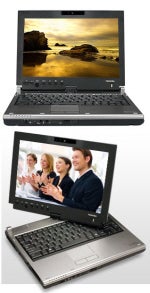 Toshiba’s latest stab at the convertible PC market comes in the form of the Portege M700. We took a look at the M700-S7002, an $1,800 unit that sports an Intel Core 2 Duo T7500 (2.2GHz) processor, along with 2GB of RAM, 160GB hard drive and a dual-layer DVD+/-RW optical drive.
As convertibles go, the Toshiba is a little on the heavy side at 4.5 pounds, but most convertibles don’t incorporate an optical drive and many of the other features found in Toshiba’s offering. As notebook computers go, the M700-S7002 is loaded; the unit offers a 12.1-inch WXGA LED widescreen display, fingerprint reader, modem, Gigabit Ethernet, 3 USB 2.0 ports, FireWire, Bluetooth, 802.11a/g/n wireless, Webcam and a Type II PC Card Slot. The unit also features a solid, full-size keyboard, touch-pad and a plethora of switches, buttons and controls.
Switching from notebook to tablet mode takes little more than a twist of the latchless display lid. The pen for the tablet pops out of a tunnel on the side of the unit. The absence of a latch makes the unit feel a little flimsy, but most users will not experience the lid flipping open on its own. The unit is surprisingly comfortable to use as a tablet, despite the unit’s thickness and weight.
Performancewise, the unit benefits from the combination of 2GB of RAM and the T7500 processor, but graphics performance suffers from the Mobile Intel Graphics Media Accelerator X3100, which uses shared memory. Discrete graphics would surely improve the unit’s performance, but at the cost of battery life and an increased price.
Speaking of battery life, users should expect to get roughly four hours out of the unit with all of the power-saving features enabled. The M700 is chock full of green technology, with environmental certifications galore, such as Energy Star 4.0, EPEAT Gold, and RoHS. Although the T7500 processor is not an ultra-low-voltage unit, the system only consumed 12 watts in an idle state according to our PS3 International Kill-A-Watt Meter. Overall performance of the unit, when equipped with Windows Vista Business Edition, offered a PassMark Rating of 492.7 using Performance Test v6.1 from PassMark software. Toshiba offers a three-year warranty on the system for all components, except for the battery, which has a one-year warranty.
All things considered, the M700 proves to be a decent notebook computer, which can offer tablet features when needed. Ideally, users will use the system mostly in its notebook configuration and then switch to tablet if they so desire. Either way, it combines the best of both worlds without any major downside—certainly a step in the right direction for convertible PCs.