









Reviews - Channel Insider
Empowering the next generation Channel
 

Sponsored Links
  • Get up and running in as quickly as 30 days with BI. Learn how today.
  • FREE Securing Smartphones & Tablets for Dummies Book from Sophos
  • 5 New Technologies That Will Change Enterprise ITAdvertisement
  • Build an IT Infrastructure That Delivers the Future

  •  

    Buffalo Technology Offers Easy-to-Expand iSCSI to the Channel

    in Reviews


    Article Rating:starstarstarstarstar / 1
    Article Views: 15013

      Table of Contents:
    1. Buffalo Technology Offers Easy-to-Expand iSCSI to the Channel
    2. The World of SAN:

    The TeraStation Pro II iSCSI storage system combines the features of Network Attached Storage (NAS) with high performance of Storage Area Networking (SAN) by embracing both technologies and creating a device that promises to be the SAN solution for the SMB market.

    Rate This Article:
    Add This Article To:

    Buffalo Technology Offers Easy-to-Expand iSCSI to the Channel


    ( Page 1 of 2 )

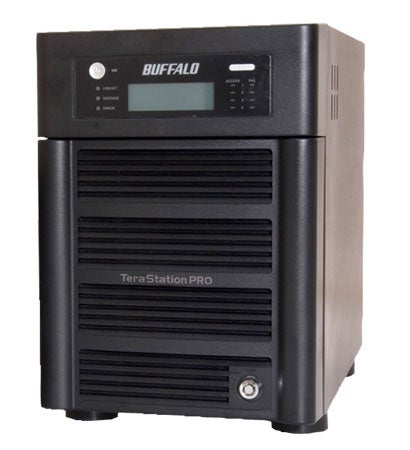
    Storage is a lot like closet space, you can never have enough and as soon as you think you do, you find more stuff to put in there. Then Buffalo Technology asked the question, “What if your closets could grow?” The company answered that question with the TeraStation Pro II iSCSI Storage Solution, a SAN solution in NAS clothing.

    The TeraStation Pro II iSCSI Storage Solution was designed from the outset to bring affordable, high-speed storage to networks of any size, with a slant towards small businesses. The small, toaster-sized unit can house four drives as large as one terabyte each - bringing the total internal capacity to four terabytes, which can be further increased by adding additional USB external hard drives. The internal drives employ SATA technology to speed data transfers and a 10/100/1000 Ethernet port brings gigabit Ethernet speed to the device.

    With those specs, one would think the device is all about speed, but there is much more to the Buffalo’s product than that. Of course, fast transfer rates are important for busy networks, but one has to consider many other factors when choosing a networkable storage appliance. For example, ease of administration, expansion and resiliency all come to mind as critical criteria.

    For resiliency, the unit supports several RAID modes, including levels 0, 1, 5, 10 and for maximum space a JBOD mode. Maximum protection comes from RAID 1, which mirrors the drives, while RAID 10 combines RAID 1 mirroring with RAID 0 striping, which boosts speeds without reducing data protection. Most users will want to choose RAID 10 as the best compromise between storage space, resiliency and speed, while those seeking the maximum amount of storage will want to go the JBOD route.


    >>> More Reviews Articles          >>> More By Frank Ohlhorst


    channel chatter


    HTML PLAIN TEXT

    Keep on top of news for VARs and Resellers with CI's Weekly Newsletter and Alerts.


    [ci] feeds
    XML
    Add Channel News, Product Reviews, Trends and Analysis to your RSS newsreader or My Yahoo!


    CHANNEL SPONSORED RESOURCE CENTER


    Start the New Year with business intelligence—it’s a smart move
    Join us on February 1 for an encore rebroadcast at either 5 am or 12 noon EST and discover how business intelligence (BI) supports companies in uncertain business and economic climates. Get expert advice on how to create a strategy that fits your organization's needs and budget and see how quickly it can pay for itself.
    Click Here
     
    Security and Availability Essentials for Running Your Business in the Cloud
    Are you moving to the cloud? Find out what every IT professional should know about security and availability before moving to the cloud. Hear what a security provider’s own CSO has to say.
    Watch Video
    A new algorithm automatically identifies relationships between variables to help reduce researcher prejudice.
    Click HereAdvertisement