











Pity the poor help desk worker, often tasked to solve near impossible
problems with nothing more than a telephone and a sense of humor. Add to that
the distributed nature of today’s enterprises, and it is easy to see why good
help desk folks are hard to find.
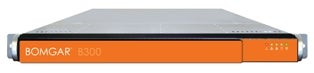
Bomgar (formerly NetworkStreaming) is aiming to make help desk workers’ lives
a little easier with the Bomgar Box, an appliance that creates a secure
platform for help desk support. Simply put, the Bomgar Box is a remote control
support appliance that one can own, as opposed to renting a remote control
service from a hosted software company.
The key marketing message behind the Bomgar Box is “Stop renting remote
support.” In other words, the company plans to bring the joy of ownership to
organizations that could only rent or lease support service solutions in
the past.
For the channel, Bomgar’s products offer some interesting opportunities. For
example, a solution provider could choose to resell Bomgar’s products to
enterprise-class customers, MSPs and other organizations, or use the products
in-house to build their own support and solution center (think MSP business
model). Either way, the Bomgar Box is well-equipped to meet the task.
First and foremost, the Bomgar Box is a device that enables clientless
remote control of any Windows, Linux, Mac or Windows Mobile system by creating
a remote connection from the support rep’s and end user’s systems to the Bomgar
Box outbound through firewalls.
While that may sound like a major accomplishment, the truth here is that
there are several hosted services that can accomplish the same thing, yet
Bomgar does offer a distinct difference (or capability). That difference comes
in the form of security. The Bomgar appliance can live inside of the corporate
firewall, and no data is ever routed through a third party. By using the Bomgar
approach, solution providers can further crank up the firewall to keep unwanted
traffic out and also block other remote access products and prevent data
leakage.
The Bomgar Box offers several features above and beyond remote control,
including extensive auditing capabilities. Worth noting is the appliances’
ability to log each and every session. Solution providers will find that the
ability to track who does what with whom, when and where is a powerful tool.
That capability can be used to generate reports that show the proficiency of
tech support personnel or, better yet, create detailed bills. The appliance can
also be integrated with HP Service Manager to build a complete end-to-end
service tracking solution.
Some will appreciate a feature called the “Bomgar Button,” which is little
more than a button-based link that can be put on a user’s desktop. The magic
behind pressing the button is pretty impressive. An end user needing assistance
just has to click on the Bomgar Button (which can be customized) to
automatically contact a tech support individual and launch a support session.
The product also offers the ability to control unattended PCs using Bomgar’s
“jump technology.” The idea here is to allow administrators to take control of
remote PCs to apply patches, install software or make other changes as part of
scheduled maintenance. By removing end-user involvement, those chores can be
done from anywhere at any time, even during the off hours, when most
maintenance chores take place.
In the world of troubleshooting, information is king—and the Bomgar Box does
its best to provide technicians with ample amounts of information. Technicians
launching a support session have access to a configuration pane, which shows
most every detail about the PC being supported. Here, technicians can view
windows updates, system information and many other foundation elements that will
give a technician a good idea of what he or she is dealing with—before even
asking the client a question. That ability not only improves the quality of the
support session, but should also gives client an indication that they are dealing
with a technician who knows what he or she is doing.
For sites that use staggered or multilayer support, the product offers an
integrated escalation capability. Simply put, a technician running a Bomgar
support session can pass that session off to another technician, without end-user
involvement. That allows for a seamless approach to kicking a serious problem
up the food chain.