











Don’t let the peripheral manufacturers hear me say this, but a mouse is a boring piece of technology. No one could possibly get excited about a mouse! That said, in today’s graphical-user-interface-based world, very few peripherals are as important as a pointing device and any improvements are welcome.
Case in point is Newton Peripherals and their MoGo series of pointing devices aimed at the notebook user. First off, one would wonder why anyone would build a separate pointing device for a notebook computer, after all, today’s notebooks all have a touchpad or a pointing stick built-in and who wants to carry around another device anyway.
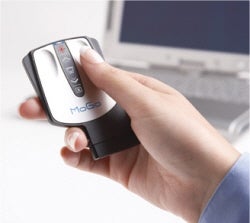 Well with MoGo, the company took the bull by the horns and came up with a device anyone would want to have and eliminated the dreaded “I have to carry around another thing” syndrome. What’s more, MoGo adds capabilities that normally don’t come with a notebook computer. The X54 can be used as a media remote control (as well as a mouse) and the X54 Pro can be used as a presentation device (as well as a mouse).
Both units are designed to be stored (and recharged) in the notebook computer’s ExpressCard/54 slot, simply slide the mouse into the slot and viola, it is stored and being recharged. Both X54s also use Bluetooth to connect to the Notebook computer, making the device truly wireless and with a range of 20 or more feet. Why is range important? Well, simply put, especially in the X54 Pro’s case, the ability to pair the mouse with a notebook computer and then control a presentation from across the room is very handy indeed. The X54 Pro also includes a laser pointer, another handy tool for the mobile presenter.
While the standard X54 isn’t designed to be a presenter’s companion, it does do a good job of extending some notebook capabilities a few feet, users will find a volume control and the ability to scroll web pages a nice capability for a mouse to have.
Now, before you rush out and buy a bunch of these units to sell to your customers, be advised, the notebook computer must have Bluetooth capabilities and must have an X54 slot. Now, let’s say your customers don’t have an X54 slot? Not too worry, MoGo also comes in PC Card Based units. What’s more, the company also makes a tiny USB to Bluetooth adaptor, just in case your customers don’t have Bluetooth either.
The MoGo X54 Presenter and the MoGo X54 Media both retails for $79.99 and Newton Peripherals is in the process of growing their channel program and seeking out partners. While selling MoGo products may not make you rich, it sure can allow you to bring some nifty technology to the party