











Network security for a small business can be a
funny thing. After all, small businesses need the same level of protection that
is found in an enterprise, yet small businesses don’t have an enterprise
budget, which creates a conundrum for VARs looking to secure those small-business
customers.
Netgear’s vision is to give small businesses good
security products at an affordable price, and the ProSafe FVS336G SMB SSL
VPN/Firewall is an excellent example of that vision.
Unlike most security appliance manufacturers,
Netgear delineates the difference between a small business and an enterprise branch
office. Most of the small-business security products on the market today blur
that line–because most vendors feel there is little difference between the
security needs of a small business and a branch office.
Netgear designed the FVS336G from the outset as a
small-business solution. The company eliminated branch office-style features,
such as enterprise manageability, to keep costs down and make the unit simpler
to deploy and use. Even with the paring down of management options, the FVS336G
proves to be quite robust. Integrators will find the unit offers everything
needed at the gateway for protecting most small businesses.
The FVS336G uses an SPI
(Stateful Packet Inspection) firewall to keep the bad stuff out of the network
and offers SSL VPN support (allowing remote
workers to securely connect into the network), two Gigabit WAN ports (can be
set up for failover or traffic bonding), four Gigabit LAN
ports, support for 25 IPSec connections and support for 10 concurrent SSL
tunnels.

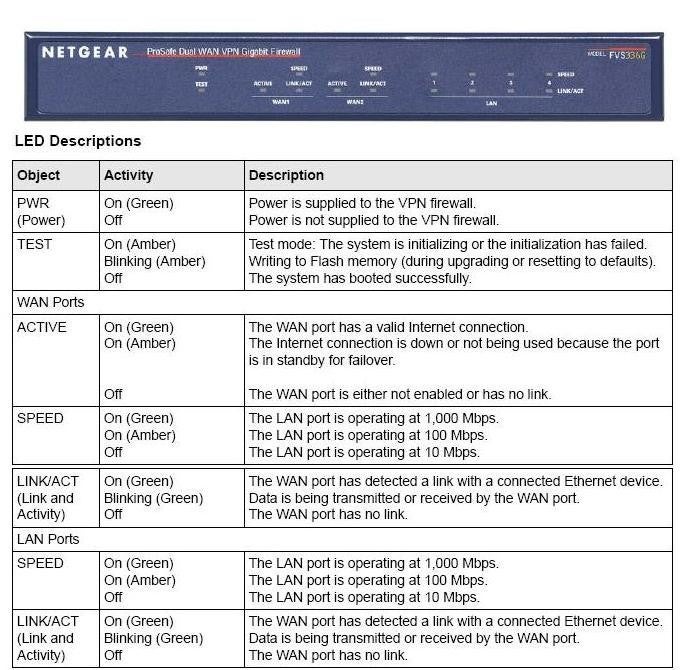
The FVS336G is housed in a blue metal case, which features
an internal power supply (no power brick needed), a power switch and plenty of
status LEDs. It measures a compact 10 inches wide, 7 inches deep and 1.5 inches
high. Installation of the unit is straightforward, and even those with limited
networking experience should have no trouble running the configuration wizard.
A basic setup takes only a few minutes, but the unit’s real
power comes from the integrated VPN, which can be configured to use IPSec or SSL
connections. Netgear only includes a single license for the IPSec VPN, but that
should be no big deal as that SSL is
probably the way most will want to go.
Setting up an IPSec VPN on the unit can be a tedious and
laborious process (pretty much the same as with any VPN product), but Netgear
does provide excellent documentation and context-sensitive help to ease the
process somewhat. SSL connectivity is a
different story. A configuration wizard can be used to quickly set up SSL
support, define accounts and even guide remote users through a connection.
One really nifty feature offered by the FVS336G is a split
tunnel mode for SSL connections. That option
allows a remote client full access to the LAN
behind the FVS336G, yet leaves Web surfing to the end user’s local connection.
Split tunneling works by issuing an IP address outside of the FVS336G’s LAN
subnet, which is then rerouted into the LAN
subnet for communications requests for devices behind the firewall. All other
traffic is routed back to the remote user’s PC and then out to the Internet.
Of course, integrators will find all of the expected
functions included on the FVS336G, such as port forwarding, dynamic DNS, user
accounts, user groups, policy definitions and so on. The administrative menus
prove to be easy to navigate and understand, while context-sensitive help aids
in polishing away any rough edges.
Powered by a 300MHz processor, the unit offers adequate
performance. Response and throughput on a small network proved to be snappy,
and the integrated Ethernet switch offered plenty of throughput for local
systems and applications. Although the WAN ports support Gigabit connectivity,
it is doubtful that the unit could leverage that level of bandwidth. That said,
it is highly unlikely any small business will have Gigabit broadband
connectivity.
The FVS336G is an excellent value at a street price of
around $300. For that price buyers will get a commercial quality unit that is
loaded with the necessary features to bring security and remote connectivity to
most any small business.
Solution providers will find Netgear’s channel program
more than adequate and will have access to all of the expected bells and
whistles, such as training, support and rebates. Solution providers will also
have the potential to earn revenue by implementing the unit’s VPN and remote
access capabilities and can use the FVS336G as a foot in the door to sell other
security solutions—such as content filtering, anti-virus and anti-spam products.