









Reviews - Channel Insider
Empowering the next generation Channel
 

Bull’s Eye Awards
Nominations Open for Channel Insider 2009 Bull’s Eye Awards
Nominations are now open for the Channel Insider 2009 Bull’s Eye Awards, which recognize excellence in customer service, technology prowess, business acumen, channel leadership, communications and community building, and innovation among vendors, solution providers, distributors and channel services companies.


Sponsored Links
  • Control VM Sprawl, What You Don’t Know Can Hurt You
  • FREE Sophos Encryption Tool: Encrypt, compress and share files easily
  • LSI 6Gb/s Portfolio Expands to Include SATA+SAS HBAs
  • Reduce the cost of managing your mobile workers.
  • Find out 7 Ways to Drive Data Center Efficiency
  • SonicWALL breaks through network and email gridlock
  • Save up to 40% on calling costs with Avaya Aura™


  •  

    KeyScan Melds Keyboard and Color Scanner into a New Peripheral

    in Reviews


    Article Rating:starstarstarstarstar / 6
    Article Views: 3387

      Table of Contents:
    1. KeyScan Melds Keyboard and Color Scanner into a New Peripheral
    2. Life with the KS810:

    Rate This Article:
    Add This Article To:
    KeyScan Melds Keyboard and Color Scanner into a New Peripheral
    ( Page 1 of 2 )

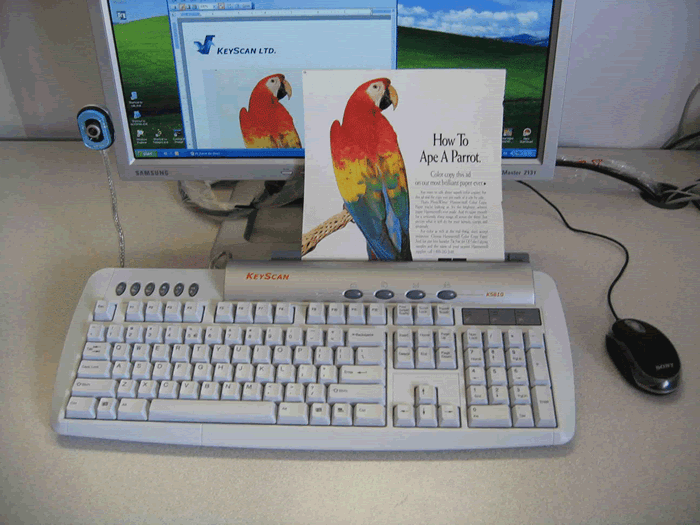
    The KS810 from KeySpan may be the perfect accessory for a business drowning in paper. Cramming a color scanner into a keyboard is no easy feat, yet KeyScan pulls it off at a price that most businesses can afford.

    The typical business is awash in paper. There are invoices, purchase orders, letters, receipts and so on floating around on the typical knowledge worker's desk, sapping productivity and creating aggravation. Making that paper problem “go away” is the design goal of KeyScan with the KS810 keyboard scanner. At $159, the KS810 offers a multifunction device, which combines a USB 2.0 Hub, full-size keyboard and a single-sheet scanner that offers a maximum optical resolution of 600 pixels per inch.

    The KS810 installs pretty much as any USB keyboard would, but does require a separate power brick. Setup is as easy as plugging the device in, running the software setup from an included CD and then powering up the unit. Everything pretty much takes care of itself.

    Resource Library:

    One word of warning, though: There are no drivers for 64-bit versions of Windows Vista, and as our luck would have it, we first tried to test the KS810 on a Vista Ultimate 64-bit system so we could play around with the scanned images in some high-end graphics software. Calls to the company did confirm that no 64-bit version of the driver was available and that there had been no demand for one. Interestingly, presenting a chicken-or-the-egg dilemma for the company, those running 64 bit Vista will not buy the KS810 because it does not support 64 bit, so in turn no buyers are requesting 64-bit support.

    We overcame our 64-bit problem by running Windows Vista 32 bit in a VMware virtual machine on our host system. That allowed us to test the scanner and then copy scanned images from our 32-bit virtual environment over to our 64-bit Vista host. A contrived way to make the product work and one that is not recommended for the typical user.


    >>> More Reviews Articles          >>> More By Frank Ohlhorst


    [ci] feeds
    XML
    Add Channel News, Product Reviews, Trends and Analysis to your RSS newsreader or My Yahoo!


    HTML PLAIN TEXT

    Keep on top of news for VARs and Resellers with CI's Weekly Newsletter and Alerts.


    CHANNEL RESOURCE CENTER
     
     
    Enterprise Mobility Zone
    The Enterprise Mobility Zone (EMZ) blog is a tool designed to help senior IT executives discuss, create and deploy next-generation mobile strategies in their organizations.
    Go beyond yesterday's tactical approach to mobility!
     
    Build A More Efficient Data Center
    Demands are growing but budgets are not. Solve your pressing IT issues using the resources you already have. Determine which technologies can help you drive efficiencies and how they are applied. Gain a quick ROI on new initiatives
    Find out how
    Let Enterprise TechBrief do the work for you. Aggregated content, tech news, product reviews, vendor updates, how-to’s—all you need to boost your efficiencies and cut costs, all from one place.
    enterprisetechbrief.com